1
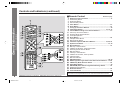
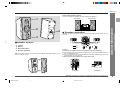
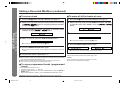
Controls and Indicators (continued)
01.
02.
03.
04.
05.
06.
07.
08.
09.
10.
11.
12.
13.
14.
15.
16.
17.
18.
19.
20.
21.
22.
23.
24.
25.
26.
27.
28.
29.
30.
31.
32.
33.
34.
- Controls and Indicators -
General Information
■ Remote Control
Reference page
Remote Control Transmitter .......................................................... 11
On/Stand-by Button
Extra Bass Button
Video/Auxiliary Button
Timer Button .................................................................................... 41
Clock Button ................................................................................... 14
Tuning Up and Down Buttons ....................................................... 22
Clear/Delete Button ........................................................... 19, 23, 37
Cursor/MD Recording Level Selector Buttons ............................ 37
Volume Up and Down Buttons
Equalizer Mode Selector Button
Tuner (Band) Button
Sleep Button .................................................................................... 42
CD Open/Close Button
Memory/Enter Button
Character Input/CD, MD Direct Buttons .......................... 19, 20, 36
Symbol/Time Button ................................................................. 21, 36
Dimmer Button ................................................................................ 12
MD Play or Pause Button
CD/MD Fast Reverse, Track Down Button
Recording Mode Selector Button
MD Stop Button
CD Play or Pause Button
CD/MD Fast Forward, Track Up Button
CD Stop Button
MD Record Button
RDS EON Button ....................................................................... 28, 29
RDS Programme Type/Traffic Information Search Button ... 27-29
CD/MD Play Mode Selector Button ............................................... 20
Auto Marker Button ........................................................................ 44
RDS ASPM (Auto Station Programme Memory) Button ............. 26
Display/Character Button
Name/TOC Button ........................................................................... 36
Track Edit Button ............................................................................ 34
Buttons with “✰“ mark in the illustration can be operated on the remote control only.
Other buttons can be operated both on the main unit and the remote control.
8
*MD9000H-E04-09
Web-site: www.sharp.co.uk/support
8
Help Line: 08705 274277 (office hours)
2001.4.20, 2:51 AM