1
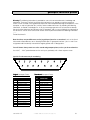
gameport input Gameport to midi conversion allows for a cheap and easy source of additional real-time controllers, and the simplicity of the interface makes it easy to design and build customized control surfaces (for instance, controllers for mixing or a machine control interface with data entry buttons or sliders, etc). The nature of the analog gameport is such that not just conventional controls such as knobs can be easily interfaced to it, but also such things as photoresistors (which could act as a light-oriented expression controller) and other variably-resistant devices. The standard analog PC gameport is designed to support two joysticks, both with 2 axis (channels which can be used for variable controllers) and two buttons (which can be used for on/off type controllers), for a total of 4 variable and 4 I/O controller devices. Sounds could be triggered from any of the gameport channels by programming nd them to transmit note-on messages with the conversion byte in the 2 databyte of the message; according to the midi specification a note on message with a velocity of zero is the same as a note off message, therefore this application would work with devices which properly follow the midi specification. For those individuals with electronics experience looking to build specialized interfaces for gameport to midi use, see the gameport interface appendix at the end of this manual. It is very elementary electronics, among the simplest type of electronics project to build, but please be careful – it is very possible to do real damage to the actual hardware components in your computer if you are not very careful, and we take absolutely no responsibility for your actions. Make sure to follow the pinout diagram / chart which applies to your particular 15-pin gameport connector – if you are using the connector on your soundcard, please pay attention to the specifics for that standard as opposed to the original IBM-standard pinout. Please understand that the gameport axis channels were never designed to be used as input devices with accurate range resolution, and while every effort has been made to ensure converter provides the most useable and reliable gameport performance possible, it may be wise not to expect precise accuracy from the gameport axis inputs for critical applications. Note that gameport axis accuracy can be improved by operating converter in a midi-only input mode. Due to the (stupidly flawed) way in which the standard IBM-PC joystick interface was designed (back in the very early 1980’s), there can be substantial differences in the circuitry between various interfaces. For this reason it is important to perform the calibration functions for each axis channel of your particular setup (joystick/controller and interface port). More information on this procedure is found in the ‘software configuration page’ in the earlier part of the manual, or on the ‘Gameport Input Settings’ page in this section. In addition, even though the gameport interface code in converter has been carefully designed to be the fastest and most efficient gameport input method possible (with an almost ridiculous amount of time and effort invested), incorporating effective dynamic acceleration and deceleration of port reading based on user activity and adaptive smoothing filters, the simple reality is that gameport input requires an obscenely generous amount of cpu time to acquire an accurate axis reading. Unlike conventional implementations of gameport input, converter does not disable interrupts during gameport input in order to guarantee reliable performance for other subsystems. Therefore, the time spent acquiring the axis timeout value from the gameport should never affect audio or midi input performance, as these take priority over gameport input. As a result, if an audio buffer size less than 72 bytes is used when converter is run in an audio input mode, gameport input is disabled until converter is quit and re-run with a larger audio buffer size (selectable in the file hardware.cfg – see the section detailing this file in the beginning of this manual). This is due to the fact that the smaller audio buffer sizes generate so many audio interrupts that converter is unable to complete the timing-based gameport input routines properly in order to acquire an accurate reading. Additionally, even if the audio converter 1.5 2000 - 2005 urr Sound Technologies Inc. 62