1
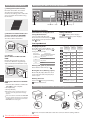
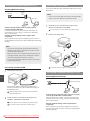
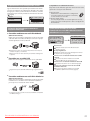
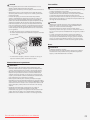
Connecting via a Wired LAN (MF212w Only)
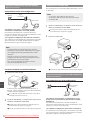
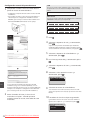
Connect the USB cable after installing the MF Drivers and the
MF Toolbox.
Checking Before the Setup
Internet
Connecting via a USB Cable
Router
or
hub
NOTE
LAN cable
Are the computer and the router (or hub) properly
connected using a LAN cable?
For more information, see the instruction manual for the
network device you are using, or contact the networking
device manufacturer.
Have the network settings on the computer been
completed?
If the computer is not properly configured, you may not use
the wired LAN connection even after completing the following
settings.
• If you connected the USB cable before installing the MF
drivers, refer to the MF Driver Installation Guide.
1
Install the driver and software using the User
Software and Manuals DVD-ROM.
See “For details on the installation procedures:” (P.13).
2
Connect the USB cable.
NOTE
• You cannot connect both the wired LAN and wireless
LAN at the same time. In addition, the machine is set to
the "Wired LAN" by default.
• When you connect to a network environment that is not
security protected, your personal information could be
disclosed to third parties. Please use caution.
• If you connect through a LAN in the office, contact your
network administrator.
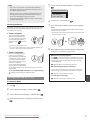
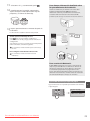
Connecting via a Wired LAN
1
Proceed to “Setting a Paper Size and Type” (P.13).
Connect the LAN cable.
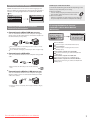
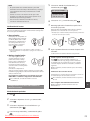
Connecting via a Wireless LAN (MF212w Only)
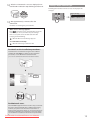
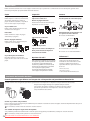
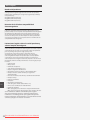
Checking Before the Setup
En
Wireless LAN Router
Internet
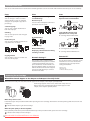
The IP address will be automatically configured in 2
minutes. If you want to set the IP address manually, see
the following items.
e-Manual “Network” ▶ “Connecting to a Network” ▶
“Setting IP Addresses”
2
Install the driver and software using the User
Software and Manuals DVD-ROM.
Is the computer connected to the router (access point)
correctly by a LAN cable or wireless LAN?
For more information, see the instruction manual for the
network device you are using, or contact the networking
device manufacturer.
See “For details on the installation procedures:” (P.13).
Proceed to “Setting a Paper Size and Type” (P.13).
10Downloaded from ManualsPrinter.com Manuals
Have the network settings on the computer been
completed?
If the computer is not properly configured, you may not
use the wireless LAN connection even after completing the
following settings.