1
Appendix
Additional information
About iTunes tagging
This function can be performed with the following iPod models.
— iPod touch 4th generation
— iPod touch 3rd generation
— iPod touch 2nd generation
— iPod touch 1st generation
— iPod classic 160GB
— iPod classic 120GB
— iPod classic
— iPod with video
— iPod nano 6th generation
— iPod nano 5th generation
— iPod nano 4th generation
— iPod nano 3rd generation
— iPhone 5
— iPhone 4S
— iPhone 4
— iPhone 3GS
— iPhone 3G
— iPhone
The song information (tag) can be saved from
the broadcasting station to your iPod. The
songs will show up in a playlist called “Tagged
playlist” in iTunes the next time you sync your
iPod. Then you can directly buy the songs you
want from the iTunes Store.
The tagged songs and the song that you can
buy from the iTunes Store may be different.
Make sure to confirm the song before you
make the purchase.
If you cannot use this function normally, update your iPod firmware.
Sequence of audio files
The user cannot assign folder numbers and
specify playback sequences with this unit.
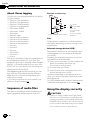
Example of a hierarchy
01
02
03
04
05
Level 1 Level 2 Level 3 Level 4
: Folder
: Compressed
audio file
01 to 05: Folder
number
1 to 6: Playback
sequence
Disc
Folder selection sequence or other operation
may differ depending on the encoding or writing software.
External storage device (USB)
The playback sequence is the same as the recorded sequence in the external storage device (USB).
To specify the playback sequence, the following method is recommended.
1 Create a file name that includes numbers that
specify the playback sequence (e.g.,
001xxx.mp3 and 099yyy.mp3).
2 Put those files into a folder.
3 Save the folder that contains the files to the
external storage device (USB).
However, depending on the system environment, you may not be able to specify the playback sequence.
For USB portable audio players, the sequence
is different and depends on the player.
Using the display correctly
CAUTION
! If liquid or foreign matter should get inside
this unit, turn off the power immediately and
consult your dealer or the nearest authorized
PIONEER Service Station. Do not use the unit
in this condition because doing so may result
in fire, electric shock, or other failure.
92
En