1
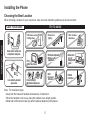
Charging the Handset
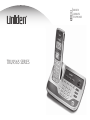
Place the handset in the base
cradle with the display facing
forward.
What if the charge/in use LED or charge
LED doesn’t light up?
Reseat the handset; make sure the contacts
on the bottom of the handset are lined up
with the contacts in the cradle.
Check the AC adapter connection.
Make sure you are not using an outlet that’s
controlled by a wall switch.
Make sure that the charge
LED illuminates when the
handset is seated.
Charge your handset at least 15 to 20 hours before plugging into the phone line.
Installing the Phone
Make sure that the
charge/in use LED
illuminates when the
handset is seated.
If you have an accessory handset,
place it in the charging cradle with
the display facing forward.