1
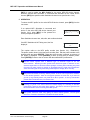
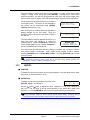
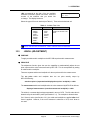
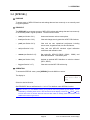
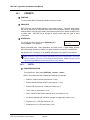
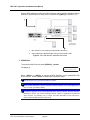
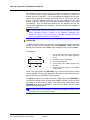
MFC-CB™ Operation and Maintenance Manual The calibration of the set value is used to minimize the amount of correction to the set point based on sense measurement that is necessary to achieve the desired set point at the MFC. This is accomplished by adjusting the set point value using an adder and a multiplier (see Section 5.2.1). When in the set view screen in the MFC calibration function, the set value displayed is the value actually output by MFC-CB after correction iterations based on the sense line readings. Thus, the difference between the set displayed and the set entered is the magnitude of the correction. Use the set adder and multiplier to minimize this value. In normal MFC-CB operation, the actual set value may be modified by a K factor and/or adjustment factors in addition to the calibration coefficients (see Section 7.1). When in the set view screen of the MFC calibration function, K factors and adjustment factors are deactivated. OPERATION To view the device channel set value after sense line based corrections and the current set adder (A) and multiplier (M), press [SPECIAL], <4cal>, select the desired device channel, press <3set>, select voltage or current, press <1view>. The display is: 1 1. Set value after sense line based corrections with the Set adder and multiplier applied (V or mA). 2. Indication that this is a Set display. 3. Device channel indicator. 4. Current value of the multiplier applied to the Set value. 5. Current value of the adder (V or mA) applied to the Set value. 2 3.0005 V Set A0.00000V M1.0000 D1 4 5 3 While in the view screen, the [SET MFC] key is active so that set point values can be changed. The set value displayed is the actual set value after sense line based corrections (see PRINCIPLE directly above). To adjust the value of the adder (A) and/or multiplier (M), press [ESCAPE] to return to the view/cal screen, and then press <2cal> to access a screen in which the values of A and M can be edited. After entering the edited values, press [ESCAPE] and return to <1view> to view the set values with the edited calibration coefficients applied. See Section 5.2.1 for an explanation of adders and multipliers and their use in adjusting electrical settings and readings. ©2001~2007 DH Instruments, a Fluke Company Page 82