1
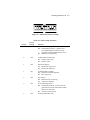
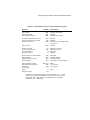
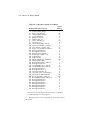
3-6 MP/8 V.34: Getting Started No Flow Control Template—&F0 This template does not include features such as a fixed serial port rate or hardware flow control. Table 3.4 on the opposite page lists all the configuration settings with differences from the default template noted in bold. Recommended Uses This is good for low-performance situations. It offers compatibility with non-typical computers, older equipment, or software that cannot handle flow control and other features. Note: If DIP switch 10 is ON when the modem is powered on, or you load factory template 0 (&F0), the following settings take effect. Table 3.3 &F0 No Flow Control LowPerformanceTemplate Options Setting Description Handshake option Normal/error control Data compression Transmit data flow control B0 &M4 &K1 &H0 ITU-T answer sequence Normal/error control Enabled Disabled Rec'd data hardware flow control Rec'd data software flow control Serial port rate select &R1 &I0 &B0 Link rate select &N0 Disabled Disabled Detect from AT command: variable rate Variable Result code subset Error-control response codes Tone/Pulse dialing Online local echo X1 &A1 P F1 Basic Enabled Pulse dial Disabled Remote Digital Loopback (RDL) Normal/Leased Data Set Ready operations Break handling &T5 &L0 &S0 &Y1 Deny RDL Normal phone line Override enabled Clear buffer, send immediately Stored telephone number Pulse dial make/break ratio Guard tone Word length* Parity* DTE rate* (bps) &Z0 −9=0 &P0 &G0 7 1 9600 Blank U.S./Canada U.S./Canada Even –