1
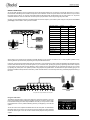
FEATURES AND FUNCTIONS
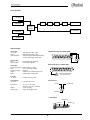
Front Panel
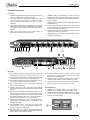
1.
GLOBAL PAD: Attenuates the signal going to the XLR direct box
outputs by -20dB to prevent transformer saturation.
5.
STANDBY: Holds the auto-switching on inputs-A so that the
SW8 does not switch to inputs-B while waiting for drone signal.
2.
AUTO ON: Activates the auto-switching mode. When active
it monitors the gate input (channels 1, 8 or direct) for a drone
signal and switches from inputs-A to inputs-B if the signal
disappears.
6.
A-B SELECT: Front panel selector used to manually switch from
inputs-A to inputs-B.
7.
ALARM LED: Illuminates when the drone signal falls below the
set threshold level.
3.
THRESHOLD: Sets the gate input sensitivity. If the drone signal
drops below the set threshold the SW8 will switch from inputs-A
to inputs-B. Two level sensing LED’s illuminate when signal is
detected.
8.
XLR OUT: Balanced, low-Z mic-level direct box outputs connect
to the PA system and are transformer isolated to help eliminate
hum and buzz caused by ground loops.
4.
MUTE: Turns off the balanced XLR outputs, leaving the
balanced D-Sub output on for local monitoring.
9.
LIFT: Disconnects pin-1 on the XLR output to further assist in
reducing noise caused by ground loops.
10. LABEL STRIP: Easy to read, wax pencil label strip for channel
identification and assigment.
®
CONTROL MONITOR
PAD
AUTO
MUTE
STANDBY
GLOBAL
1
ON
A TONE B
2
3
INPUT SELECT
A
THRESHOLD
4
5
B
6
ALARM
LIFT
LIFT
LIFT
LIFT
LIFT
LIFT
LIFT
LIFT
PIN-1
PIN-1
PIN-1
PIN-1
PIN-1
PIN-1
PIN-1
PIN-1
TONE
BELOW
THRESHOLD
10
9
8
7
24
11
12
13
8-CH AUTO
BACK-UP
SWITCHER
14
15
16
23
17
18
19
20 21
22
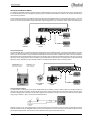
Rear Panel
11. TRS ¼” INPUTS-A & B: Two sets of eight balanced or unbalanced
line-level inputs for your primary and backup multi-track units.
12. D-Sub OUTPUT: Balanced line-level output is used to send the
active input set (A or B) to the PA or local monitor system.
13. D-Sub INPUTS: Balanced line-level A and B inputs are used to
connect two multi-track playback units to the SW8.
14. ALT 1/8: Selects between channel 1 or channel 8 to receive the
drone track for auto-switching.
15. FILTER: Lets you use a binary audio signal such as SMPTE
time code as a drone track by smoothing out the signal for better
detection.
16. AUTO-SWITCH GATE INPUT and MONITOR OUTPUT: The ¼”
TRS input lets you connect directly to the auto-switching gate.
Used as an alternate to channels 1 or 8, so that all eight channels
are available for playback tracks. The ¼” monitor output lets you
listen to the drone track to ensure it is being received.
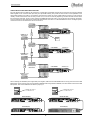
20. CONTACT ALARM: Tip-sleeve ¼” connection from an internal
relay can turn on a siren or beacon when the drone signal
drops below the set threshold.
21. CONTACT INPUT: Tip-sleeve ¼” latching contact closure is
used to switch the SW8 with a remote footswitch or contact.
22. 15 VDC SUPPLY: Provides power to the SW8. Handy cable lock
ensures supply will not be accidentaly disconnected.
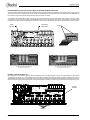
Top Panel Switches
23. REMOTE LINK OUTPUT MODE: Used when linking the
SW8mk2 to an older SW8(mk1) through ¼” LINK-OUT jack.
24. STANDBY SWITCH CONTROL MODE: Assigns the standby
function to either the local front panel switch or the MUTE
footswitch on the optional JR2.
17. ON A/B (JR2 FOOTSWITCH): Turns on remote A/B switching
when using the optional JR2 footswitch and disables the front
panel A/B select switch.
18. JR2 FOOTSWITCH XLR: Connection for the optional JR2
remote footswitch. Lets you remotely switch between A & B
inputs and engage the standby mode.
23
24
19. JR2-IN and LINK-OUT: ¼” TRS input may be used with the JR2
instead of the XLR. Also used to link multiple SW8’s together for
larger 16 and 24 channel playback systems.
Radial Engineering Ltd.
2
SW8™ MK2 User Guide