1
19
THE DNP100 DRAKE NETWORK PLAYER
CUSTOM AUTHORING IN DSM (continued)
PLAYLISTS Tab
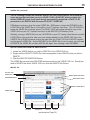
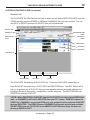
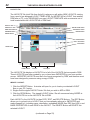
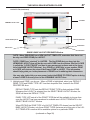
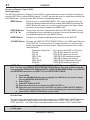
The PLAYLISTS Tab (fifth Tab from the left) is where you will author NEW PLAYLISTS from the
VIDEO files that you have ADDED to DSM and CHANNELS that you have created. You can
also EDIT or DELETE previous PLAYLISTS that you have authored.
Windows Tabs
DSM Section Tabs
DELETE SELECTED
Button
NEW PLAYLIST
Button
DELETE ALL
Button
DELETE Button
EDIT Button
COPY Button
PLAYLISTS List
PLAYLIST Name
Description
Preview
The PLAYLISTS Tab displays a PLAYLISTS List. These are PLAYLISTS created by you.
Each PLAYLIST listed here has a COPY, EDIT, and DELETE Button. The EDIT Button will allow you to go back into a PLAYLIST that you have already authored and make changes to it,
including, the name, description, included files, and file sequence. The DELETE Button will
DELETE the selected PLAYLIST.
*NOTE: When DELETING a PLAYLIST from the PLAYLISTS List, the original VIDEO files
(and / or CHANNELS) will not be DELETED from your PC / laptop. DSM will remove the
VIDEO file / CHANNEL’s record and PATH only as it pertained to the particular PLAYLIST
that was DELETED. The VIDEO files and CHANNELS will remain as valid and available
SELECTIONS from the FILE POOL in the NEW PLAYLIST Window (Page 20) when authoring a NEW PLAYLIST.
(continued on Page 20)