1
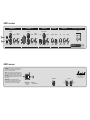
LR150 Rear Panel Features
N.B. Reads from right to left on panel.
1. Mains Input
7. Line Input Jack
This is a high impedance unbalanced input.
For connection to the mains. We would always
recommend that your plug is wired in accordance
with your country’s regulations
Channel 4
8. Mic Input XLR
2. Power
This is a low impedance balanced input for use
with microphones.
Switches the mains power to the combo
9. Line Input Jack
Channel 1
This is a high impedance unbalanced input.
3. Line Input Jack
10. Send Jack
This is a high impedance unbalanced input.
Typical uses of Line Inputs are Keyboards, drum
machines and sequencers.
For connection to the input of an external effects
processor.
11. Return Jack
For connection to the output of an external effects
processor.
Channel 2
4. Line Phono Input
12. Line Out Jack
This is a high impedance unbalanced input.
Typical uses of Line Inputs are drum machines,
C.D. players, tape deck, 4 tracks and computers.
The Line Out jack can be used for connection to
recording equipment for direct recording or for
connection to a P.A. system. This is not effected
by the Master Volume (item 21).
5. Line Input Jack
13. Remote Jack
This is a high impedance unbalanced input.
Allows you to switch internal reverb on and off
from remote footswitch (optional extra, model
no. PEDL-00020).
Channel 3
6. Mic Input XLR
This is a low impedance balanced input for use
with microphones.
AUDIO STATE
LR300
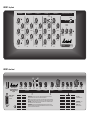
LR300 Top Panel Features
1, 6, 11, 16 & 23. High
4, 9, 14, 21 & 26. Vol
Controls the high frequencies on Channel 1, 2, 3,
4 and 5 respectively.
Controls individual volume level for Channel 1,
2, 3, 4 and 5 respectively. Overall volume will be
governed by the Master Volume (item 30).
2, 7, 12, 19, & 24. Effect
5, 10, 15, 22 & 27. Low
When using the in-built reverb on the LR300 this
control will adjust the amount of reverb on
Channel 1, 2, 3, 4 and 5 respectively. When
using an external effects processor this will
control the amount of effected signal, as it
dictates the amount of signal to the Effects Send
on the rear panel.
Controls the Low frequencies on Channel 1, 2, 3,
4 and 5 respectively.
17. Switch - Speaker Emulator
Switches Speaker Emulator on.
The LR300 features Marshall acclaimed speaker
emulation circuitry on Channel 4. When in
operation, this will re-voice this channel to suit
guitar.
Note - this will be affected by the Effect Return
control (item 28) and the Master Reverb control
(item 29).
18. LED
3, 8, 13, 20 & 25. Mid
Indicates when Speaker Emulator is on.
Controls the middle frequencies on Channel 1, 2,
3, 4 and 5 respectively.
6