1
[Ctrl-Esc]
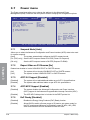
[Power Key]
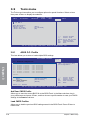
3.7.7
Allows you to turn on the system by pressing the Ctrl key and Esc key
of the PS/2 keyboard. This feature requires an ATX power supply that
provides at least 1A on the +5VSB lead.
Allows you to turn on the system by pressing the Power key on the PS/2
keyboard. This feature requires an ATX power supply that provides at least
1A on the +5VSB lead.
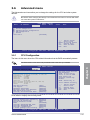
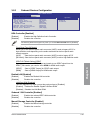
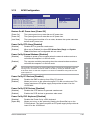
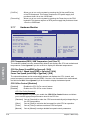
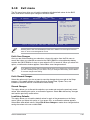
Hardware Monitor
BIOS SETUP UTILITY
Power
Hardware Monitor
CPU Temperature (PECI)
CPU Temperature(PECI)
MB Temperature
[35ºC/95ºF]
[34ºC/93ºF]
CPU Fan Speed
CPU Q-Fan Control
[3590RPM]
[Disabled]
Chassis Fan 1 Speed
Chassis Q-Fan Control
[N/A]
[Disabled]
Power Fan Speed
[N/A]
CPU
3.3V
5V
12V
[ 1.040V]
[ 3.008V]
[ 4.776V]
[11.648V]
Voltage
Voltage
Voltage
Voltage
←→
↑↓
Enter
F1
F10
ESC
Select Screen
Select Item
Go to Sub Screen
General Help
Save and Exit
Exit
v02.61 (C)Copyright 1985-2009, American Megatrends, Inc.
CPU Temperature(PECI) / MB Temperature [xxxºC/xxxºF]
The onboard hardware monitor automatically detects and displays the CPU and motherboard
temperatures. Select Ignored if you do not wish to display the detected temperatures.
Chapter 3
CPU Fan Speed [xxxxRPM] or [Ignored] / [N/A]
Chassis Fan 1 Speed [xxxxRPM] or [Ignored] / [N/A]
Power Fan Speed [xxxxRPM] or [Ignored] / [N/A]
The onboard hardware monitor automatically detects and displays the CPU, chassis, and
power fan speed in rotations per minute (RPM). If the fan is not connected to the motherboard,
the field shows N/A. Select Ignored if you do not wish to display the detected speed.
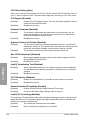
CPU Q-Fan Control [Disabled]
[Disabled]
[Enabled]
Disables the CPU Q-Fan control feature.
Enables the CPU Q-Fan control feature.
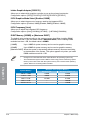
CPU Fan Profile [Standard]
This item appears only when you enable the CPU Q-Fan Control feature and allows
you to set the appropriate performance level of the CPU fan.
[Standard]Sets to [Standard] to make the CPU fan automatically adjust depending on
the CPU temperature.
[Silent]Sets to [Silent] to minimize the fan speed for quiet CPU fan operation.
[Turbo]
Sets to [Turbo] to achieve maximum CPU fan speed.
[Manual] Sets to [Manual] to assign detailed fan speed control parameters.
3-30
Chapter 3: BIOS setup