1
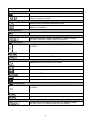
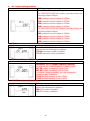
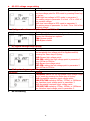
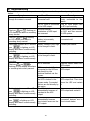
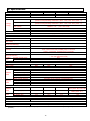
05: ECO voltage range setting Interface Setting Parameter 2 & 3: Set the acceptable high voltage point and low voltage point for ECO mode by pressing Down key or Up key. HLS: High loss voltage in ECO mode in parameter 2. The setting range in parameter 3 is from +7V to +24V of the nominal voltage. LLS: Low loss voltage in ECO mode in parameter 2. The setting range in parameter 3 is from -7V to -24V of the nominal voltage. 06: Bypass function enable/disable when UPS is off Interface Setting Parameter 3: Enable or disable Bypass function. You may choose the following two options: ENA: Bypass enable DIS: Bypass disable 07: Bypass voltage range setting Interface Setting Parameter 2 & 3: Set the acceptable high voltage point and acceptable low voltage point for Bypass mode by pressing the Down key or Up key. HLS: Bypass high voltage point: 230-264: setting the high voltage point in parameter 3 from 230Vac to 264Vac. LLS: Bypass low voltage point: 187-220: setting the low voltage point in parameter 3 from 187Vac to 220Vac 08: Input voltage range setting Interface Setting Parameter 2 & 3: Set the acceptable input voltage range for AC mode by pressing the Down key or Up key. HLS: Acceptable maximum input voltage point: 280/270/260: selecting 280Vac, 270Vac, or 260Vac as the maximum input voltage point in parameter 3. LLS: Acceptable minimum input voltage point: 175/185/195: selecting 175Vac, 185Vac, or 195Vac as the minimum input voltage point in parameter 3. 00: Exit setting 11