1
System Security
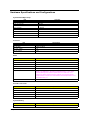
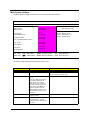
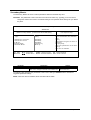
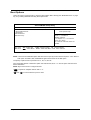
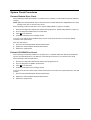
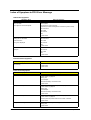
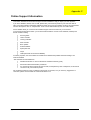
The System Security screen contains parameters that help safeguard and protect your computer from
unauthorized use.
PhoenixBIOS Setup Utility
Information
Main
Advanced
Set Supervisor Password
Set User Password
Password on boot:
Boot
Processor Serial Number
Exit
[Enter]
[Enter]
[Disabled]
Set Primary Hard Disk Password
F1 Help
Esc Exit
Security
[Enter]
[Enabled]
Item Specific Help
Press <Enter> key to set
Supervisor Password to enable any
password features.
Then password entry is required to
enter BIOS Setup.
Select Item
F5/F6 Change Values F9 Setup Defaults
Select Menu Enter Select Sub-Menu F10 Save and Exit
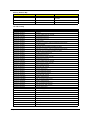
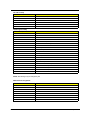
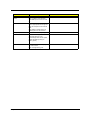
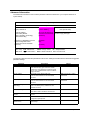
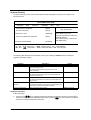
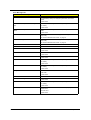
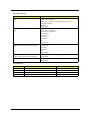
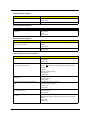
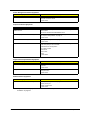
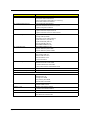
The following table describes the parameters in this screen. Settings in boldface are the default and
suggested parameter settings.
Parameter
Set Supervisor Password
Description
While entering SETUP, BIOS need to request user to enter
supervisor password if set.
Options
Enter
This password protects the BIOS SETUP menu from
unauthorized entry.
Set User Password
During POST, BIOS need to check user password if set.
Enter
This password protects the system from unauthorized user
entry before OS boots up.
Password on Boot
During POST, BIOS need to check power on password if set.
Disabled or Enabled
This password protects the computer from unauthorized entry
during boot-up.
Set Primary Hard Disk
Password
During POST, BIOS need to check hard disk password if set.
Processor Serial Number
Display the process serial number.
Enter
This password protects the computer from unauthorized entry
during boot-up if a second Hard disk is inserted.
Enabled or Disabled
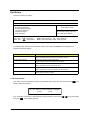
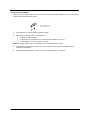
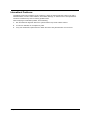
Setting a Password
Follow these steps:
1.
45
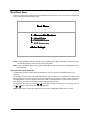
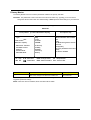
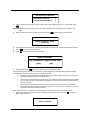
Use the cursor w/y keys to highlight a Password parameter (Supervisor Password, User Password,
Password on boot or Primary Hard Disk Password) and press thee key. The password box appears
as below if choosing Set Supervisor Password:
Aspire 1606