1
MIDI Errors
MIDI errors are related to the MIDI input of the LAGOON card. Receiving MIDI
data is possible in two ways: MIDI data coming in from the LAGOON MIDI cable
connected to your external MIDI equipment or MIDI data coming in from the ADAT
Sync cable connected to your ADAT recorder.
Error
Possible Reasons and Remarks
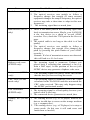
Frame error
There was an error in receiving MIDI bytes. The
start bit, the stop bit, or both of them are not
detected correctly. Check your MIDI cable and
external equipment.
Overflow
Some of the incoming MIDI data had to be discarded.
Perhaps your PC was unable or too busy to process
MIDI data fast enough.
General Errors
General errors are related to the basic function of the LAGOON card and its driver.
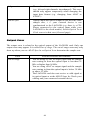
Error
Driver version
mismatch
Possible Reasons and Remarks
1. The version number of the driver and the version
number of the LAGOON Tools are different.
Download the newest LAGOON Tools and driver
from http://www.m-audio.com.
2. You are using a LAGOON card which does not fit the
driver. Contact M-Audio tech support for a correct
driver version.
DSP error
Something inside the DSP went wrong. Please shut
down Windows and power cycle your PC. If this
error appears again, contact M-Audio tech support.
Loss of realtime
The DSP was unable to transmit as many data as
necessary to the PC within a given time. Probably
some other PCI card blocks the PCI bus heavily.
Refer to Troubleshooting.
23