1
Epson Stylus Pro 7700/7710/9700/9710
User’s Guide
The Control Panel
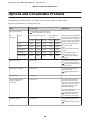
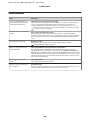
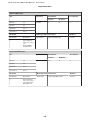
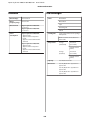
Item
Parameter
Explanation
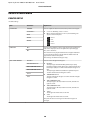
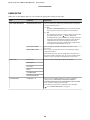
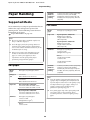
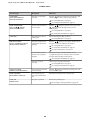
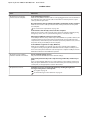
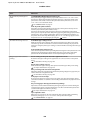
PAPER SIZE CHECK
ON *
You can select whether to check the paper width.
OFF
❏
ON:
Check the paper width and top edge of the paper.
❏
OFF:
Do not check the paper width and top edge of the paper.
The printer continues to print even if the paper width does
not match the data width, and the printer may print
beyond the paper. In addition, a wider blank margin may
appear at the top of each page. Because this soils the inside
of the printer, we recommend you select ON.
❏
ON:
If the paper is not straight, an error message appears on the
LCD panel and the printer stops printing.
❏
OFF:
A paper align error does not occur even if the printed data
is out of range of the paper, and the printer continues to print.
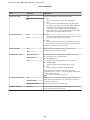
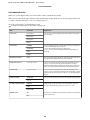
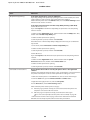
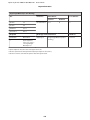
PAPER SKEW CHECK
ON *
OFF
This setting is effective for roll paper only.
REFRESH MARGIN
ON *
When you select ON, the printer cuts an extra print area
automatically after borderless printing.
OFF
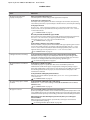
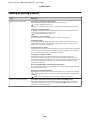
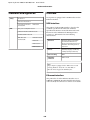
AUTO NOZZLE CHECK
ON: PERIODICALLY *
The printer performs a nozzle check and if there are missing
dots, it performs cleaning automatically.
ON: EVERY JOB
❏
ON: PERIODICALLY
Automatically performs a nozzle check periodically.
❏
ON: EVERY JOB
Performs a nozzle check before printing each job.
❏
OFF
Does not perform a nozzle check automatically.
OFF
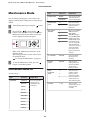
You can change the number of times which cleaning is
performed at AUTO CLEANING TIMES in the Maintenance mode.
You can set up to 3 times.
See “Maintenance Mode” on page 27
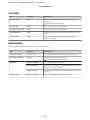
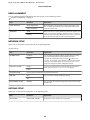
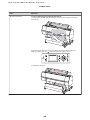
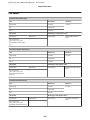
PRINT NOZZLE PATTERN
OFF *
ON: EVERY PAGE
ON: EVERY 10 PAGES
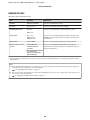
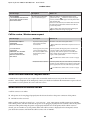
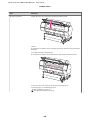
INITIALIZE SETTINGS
EXECUTE
When you select ON, the printer prints the nozzle check pattern
before printing each print job or the 10th sheet, depending on
the setting you have set.
This setting is effective for roll paper only.
You can return all setting values you have made in the PRINTER
SETUP menu to their factory set value.
21