1
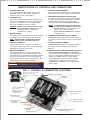
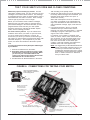
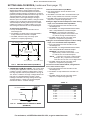
qtm9322b.pm5 J103 JUMPER SETTINGS FOR BATTERY TYPE NOTE: When programming, use either fresh Alkaline batteries (or an external power supply), to power the Quick Talk. When programming is finished, you may either insert Ni-Cd batteries or leave Alkaline batteries in place. WARNING: DO NOT attempt to charge Alkaline batteries from an external +12 VDC power supply. When powering Quick Talk with ALKALINE BATTERIES, set J103 as follows to disconnect the charging current paths: a. To set the Quick Talk for use with alkaline batteries, move Jumper J103 to cover only one pin of the jumper base, as shown in FIG-4; this setting prevents the flow of charging current. b. Dial "943" to program the Quick Talk for use with alkaline batteries. Alkaline NI-CD FIG4. J103 POSITION FOR USE WITH ALKALINE OR NI-CD BATTERIES When powering Quick Talk with NI-CD BATTERIES, set J103 as follows to connect the charging current paths: c. Cover both pins with Jumper J103, as shown in FIG4, to charge the Ni-Cd batteries from the External Power connection. d. Dial "944" to adjust the Quick Talk voltage; the unit then transmits a "Low Battery" phrase. NOTE: Because Ni-Cd batteries self-discharge rapidly, you must constantly charge them with an external +12 VDC power. CONNECTING AN EXTERNAL 12 VDC POWER SUPPLY TO CONNECT AN EXTERNAL 12 VDC POWER SUPPLY: The standard Quick Talk may be used with an external 12 VDC power supply. Instructions: 1. Route the power supply cable trough the Ritron #02500127 strain relief fitting as described in FIG-7 on page 14. 2. Use Ritron #RPS-203 Power Supply (11-15 VDC, 200 mA), or equivalent, to power the Quick Talk. The Quick Talk requires 11-15 VDC, 150 mA minimum. 3. Connect the positive (+) terminal of the power supply cable to the +EXT. PWR screw terminal on the Quick Talk, refer to FIG-5. 4. Connect the negative (-) terminal of the power supply cable to the -EXT. PWR screw terminal on the Quick Talk, refer to FIG-5. Page 8 + - SWITCH 1 EXTERNAL POWER SUPPLY FIG5. EXTERNAL POWER SUPPLY CONNECTIONS For assistance, call RITRON at 800-872-1872, or go to www.ritron.com