1
Registering the Settings in the Software
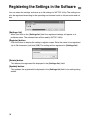
You can name the settings and save up to 20 settings for WFT-E1 Utility. The settings can
also be registered according to the operating environment such as infrastructure and ad
hoc.
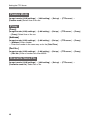
[Settings list]
When you click on the [Settings list] field, the registered settings will appear in a
pulldown menu. The selected item will be read by WFT-E1 Utility.
[Register] button
Click this button to display the setting’s register screen. Enter the name to be registered
(up to 20 characters) and click [OK]. The setting will be registered in [Settings list] .
[Delete] button
This deletes the registered file displayed in the [Settings list] field.
[Update] button
This updates the registered file displayed in the [Settings list] field to the setting being
edited.
18