1
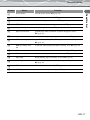
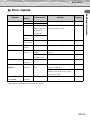
Error signals
Error signals
Power
Access
Indicator
status
Printer status
Solution
On
Power ON
Off
Power OFF
On*
Connected to a
Wait for a while. Do not disconnect
digital camera, or
the digital camera or PC.
–
the printer is
18
–
cooling off
Blinking
Page(s)
Communicating
slowly
Blinking
Printing
–
very slowly
PAPER
Blinking
–
Out of paper
Load paper into the paper-cassette.
22, 32
Blinking
End of ink
Replace the ribbon cartridge with a
19, 32
slowly
ribbon
new one.
No ribbon
Set a ribbon cartridge into the printer.
19
Paper jam
Remove jammed paper.
36
slowly
RIBBON
cartridge is set
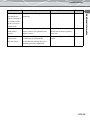
Access and PAPER
Blinking
together
Access and
Blinking
Communication
Check whether the digital camera
RIBBON
together
error
supports PictBridge.
–
Turn the printer off and on, then try
printing again. If the error persists,
–
contact your dealer.
Access, RIBBON,
Blinking
and PAPER
together
Internal problem
Contact your dealer.
–
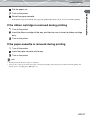
* This light goes off when the connection is complete.
EN-33
Additional information
Indicator