1
20
3. TV Connections
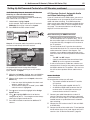
HDMI Device (Cable Box, Satellite
Receiver, DVD Player, or Other Device)
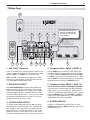
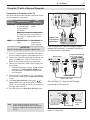
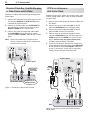
Required: HDMI-to-HDMI cable.
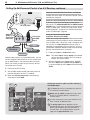
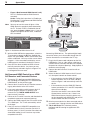
Connect an HDMI cable from the TV back panel to the
HDMI device output. HDMI devices provide video and
audio through the single cable.
Mitsubishi recommends you use category 2 (highspeed) HDMI cables to connect HDMI 1.3 source
devices. High-speed category 2 cables bring you the
full benefits of Deep Color and x.v.Color. See “HDMI
Cable Categories,” page 10, for more on HDMI cable
types.
DVI Video Device (Cable Box, Satellite
Receiver, DVD Player, or Other Device)
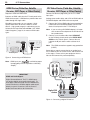
Connect DVI devices (digital only) to the TV’s HDMI
input jacks.
Analog stereo audio cables and a DVI-to-HDMI cable or
DVI/HDMI adapter and HDMI cable are required.
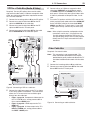
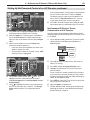
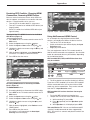
1. Connect the DVI-to-HDMI cable (recommended) or
HDMI cable with DVI/HDMI adapter from the DVI
device’s back panel to the TV’s HDMI jack.
Note: If you are
using a DVI/HDMI adapter, it is important to connect the adapter to the DVI device for
best performance.
2. Connect a set of audio cables from AUDIO OUT
Y/ VIDEO
DIGITAL
AUDIO
OUTPUT
R
AUDIO L
Pr
Pb
Pb
IR-NetCommand
PC: VGA, W-VGA, SVGA, W-SVGA,
XGA, W-ZGA, SXGA, 720p/ 1080p
R
Output / External
Controller Input
INPUT 2
Y
R
HDMI
1
2
3
Pr
(480i / 480p / 720p / 1080i)
INPUT 1
ANT 2 / AUX
ANT 1 / MAIN
HDMI
VIDEO: 480i/480p/720p/1080i/1080p
AUDIO: PCM STEREO
VIDEO
INPUT 3
R AUDIO L
"OZ)%.*
EFWJDF
S-VIDEO
INPUT 3
57CBDLQBOFM
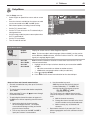
Figure 2. Connecting an HDMI device.
Note: The HDMI connection supports copy protection
(HDCP).
Some devices require connection to an analog input
first in order to view on-screen menus and to select DVI
as the ouput. Please review your equipment instructions for DVI connectivity and compatibility.
Note: HDMI inputs are
certified for proper
interoperability with other products certified by
Simplay™.
3D
GLASSES
EMITTER
DVI/PC
INPUT
L
R
AUDIO
ANT 2
AVR
AUDIO
OUTPUT
INPUT
DVI/PC
L
R
AUDIO
R AUDIO L
L
ANT 1
Y/ VIDEO
IMPORTANT
DIGITAL
AUDIO
OUTPUT
HDMI and Audio Signals
Digital Surround Sound: The TV’s HDMI inputs
can receive digital stereo audio signals only. To
hear digital surround sound from an HDMI device,
connect the device’s HDMI or digital audio output
directly to your A/V receiver. See the Owner’s
Guides for those devices for instructions.
R
AUDIO L
Pr
Pb
Y
R
HDMI
VIDEO: 480i/480p/720p/1080i/1080p
AUDIO: PCM STEREO
VIDEO
INPUT 3
DVI/PC
INPUT
L
R
AUDIO
L
Pb
IR-NetCommand
PC: VGA, W-VGA, SVGA, W-SVGA,
XGA, W-ZGA, SXGA, 720p/ 1080p
R
Output / External
Controller Input
INPUT 2
3
"6%*0
AVR
AUDIO
OUTPUT
HDMI
2
1
Pr
(480i / 480p / 720p / 1080i)
INPUT 1
3D
GLASSES
EMITTER
on the DVI device back panel to the DVI/PC INPUT
AUDIO on the TV back panel. Connect the red
cable to the R jack and the white cable to the L
jack.
S-VIDEO
INPUT 3
57CBDLQBOFM
%JHJUBM%7*
EFWJDF
3
"6%*0
%7*065
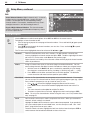
Figure 3. Connecting a digital DVI device
3