1
USING THE MACHINE IN A
MACINTOSH ENVIRONMENT
To use the machine as a printer for the Macintosh, the PS3 expansion kit AR-PK1 must be installed.
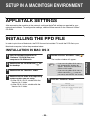
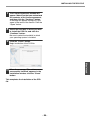
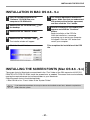
Install the PPD file needed to use the machine as a printer from the "Software" CD-ROM that
accompanied the network expansion kit.
CD-ROMS IN THE NETWORK EXPANSION KIT
In a Macintosh environment, use the "Software" and "Network Utilities" CD-ROMs that are contained
in the network expansion kit.
1. "Software" CD-ROM
The "Software" CD-ROM contains the following software programs:
• PPD file
A Macintosh computer refers to the PPD file when using a printer driver for printing.
• Acrobat Reader 4.05
Software that allows you to view the online printer manual on your computer.
Caution
The PPD file on the "Software" CD-ROM cannot be used when the machine is connected to
your computer with a USB or parallel cable.
2. "Network Utilities" CD-ROM
The "Network Utilities" CD-ROM contains the following software programs:
• PSC Setup Utility
This is a utility that lets you configure the machine's network settings from a Macintosh.
Caution
The term "Print Server Card" appears in the "Network Utilities" CD-ROM. Where "Print
Server Card" appears, please substitute "Network expansion kit".
HARDWARE AND SOFTWARE REQUIREMENTS
You will need the following hardware and software in order to install the PPD file for Macintosh.
Operating system
CPU and RAM
Note
Mac OS 8.6 to 9.x, 10.1.5, and 10.2 to 10.2.8 (except 10.2.2)
Requirements of the operating system must be satisfied.
If you are using Mac OS 8.6 to 9.x, make sure that LaserWriter8 has been installed and that the
"LaserWriter8" checkbox is selected (
) in "Extensions Manager" in "Control Panels". If not,
install it from the system CD-ROM supplied with your Macintosh computer.
-8-