1
JOB EDITOR
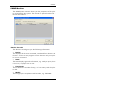
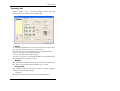
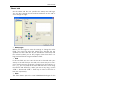
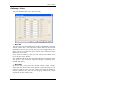
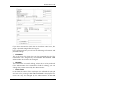
DY input field is automatically filled with the value of the Scale
DX, if you have activated the "Maintain ratio" option. If you then
want to enter the Scale DY value independently, you must deactivate the "Maintain ratio" option. In this case, you must consider
that the drawing will be distorted.
• Media type and position
Use this menu to select which type of media the drawing is to be
printed on: Don´t care, Paper, Translucent or Film. The selection depends on what roll of medium you have fed in the plotter. The "Position" field is used to set the symbolic position on the
paper if the image is to be printed on a larger paper format.
E.g. if you have a ISO A4 drawing, which is printed in original
size on ISO A1, you can fix here where the drawing is to be positioned on the larger sheet.
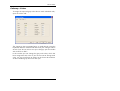
• Cut Mode
The selection available is "Format". If you don´t activate "Format", the plotter cuts the drawing immediately after the last data
has been printed, it means synchronous. This results in optimum
paper or medium use, because it produces the smallest amount
of waste.
On the other hand, if you want the printout to always be cut to a
standard format, no matter how much space remains unprinted,
activate "Format". The plotter then always cuts to the next largest
format. This can be a disadvantage if e.g. a drawing is only
around 0.5 cm larger than a ISO A5 page is printed on a ISO
A4 page and thus almost 50 % of the sheet remains unused.
The advantage is that some folders require exact formats and
you can match them using the "Format" setting.
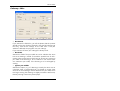
• Copies
You can enter any number of copies between 1 and 999 to be
printed by the job .
• Rotate
Here you can say whether the drawing is to be rotated or not
during plotting. Rotations of 0°, 90°, 180° and 270° are possible. When set to "Auto", RW-480 PLOTBASE rotates automatically if this results in less waste paper
RW-480 CLIENTS
42