1
 defined shares. Of course, if you checked “Create Private Folder” in step (9), then read/write access has automatically been provided to this user’s private folder.
Though the initial factory setting provides for three default shares (admin, guest-
share, and public), only “public” is available for selection for access to new user accounts.
When done with this form, press Complete.
Add New Group
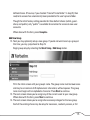
12.Next you may optionally setup a new group. If you do not want to set up a group at this time, you may jump ahead to Step 15.
Begin group setup by selecting the Quick Setup / Add Group button.
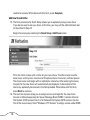
Fill in the initial screen with your group’s name. The group name must be lower-case and may be a maximum of 20 alphanumeric characters, without spaces. The group name must begin with an alphabetic character. Press Next to continue.
13.The next screen allows you to assign any of the current users to your new group. When done with this form, press Next to continue.
14.The next screen allows you to assign share access privileges for the new group. Each of the existing shares may be setup for no access, read-only access, or full 15