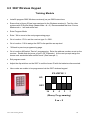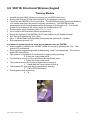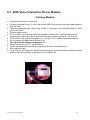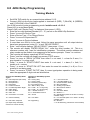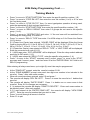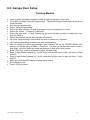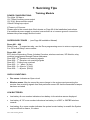
1
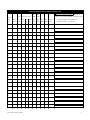
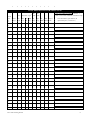
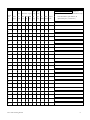
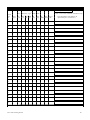
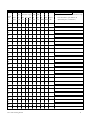
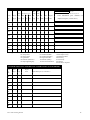
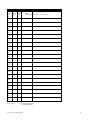
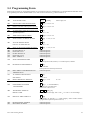
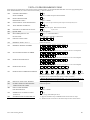
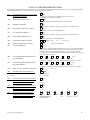
3.4 Programming Form
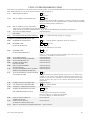
Partition-Specific fields are programmed separately for each partition (shown as shaded fields). See the PARTITION-SPECIFIC section
for programming these fields. Standard default (*97) values are shown in brackets [ ], otherwise default = 0.
NOTE: New fields (phase 2) are indicated by dotted underlined field numbers and titles.
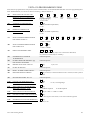
*00
INSTALLER CODE
*01
INSTALLER CODE RESTRICTION
[0] 1 = Yes; 0 = No
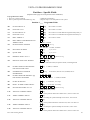
*03
FINAL CONTACT SET (partition-specific)
[0] 1 = Yes; 0 = No
*04
AUTOBYPASS EXIT ROUTE FAULTS
[0]
(partition-specific)
| | |
[4140]
1 = Yes; 0 = No
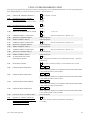
*05
ARM WITH LOW BATTERY
[0] 1 = Yes; 0 = No
*06
ZONE TYPE 5 ALWAYS ALARM
[0] 1 = Yes; 0 = No
*07
ALLOW ARMING WITH
[0]
FAULTS IN EXIT ROUTE
*08
SELF ACTIVATING SIREN OUTPUT
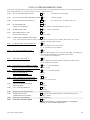
*09
*10
*11
*12
*13
ENTRY DELAY #1
EXIT DELAY #1
ENTRY DELAY #2
EXIT DELAY #2
BELL TIMEOUT
*14
ZONE 9 RESPONSE TIME
Enter 4 digits, 0-9
1 = Yes; 0 = No
[0] 1 = Yes ; 0 = No
Partition-Specific
Partition-Specific
Partition-Specific
Partition-Specific
Partition-Specific
[0]
1 = fast response mode (10msec); 0 = normal response, 350msec
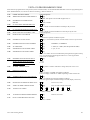
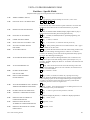
*15
KEYSWITCH ASSIGNMENT
[0]
1-8; 0=disable
Enter partition in which keyswitch used.
*16
BELL/SIREN CONFIRMATION OF
ARMING DING
*17
AC MAINS LOSS KEYPAD
SOUNDING
Partition-Specific
[0]
1=yes; 0=no
*18
MAINS PRESENCE DISPLAY
[0] 1 = Yes
*19
RANDOMISE AC MAINS
[0] ( 1 = recommended )
LOSS REPORT
*20
TELEPHONE MODULE
PHONE CODE
*21
PREVENT FIRE TIME-OUT
0 = No
1=10-40 min; 0=normal report
about 2 min. after AC loss
|
|
[00] [11]
Enter 01 - 09 for first digit; enter 11 for "*" or 12 for "#" for second digit.
[0]
1 = disable (no timeout); 0 = normal burglary alarm sounder duration
(programmed in partition-specific field *13)
*22
*23
KEYPAD PANIC ENABLE
MULTIPLE ALARMS
Vista 120 Training Guide
Partition-Specific
Partition-Specific
19