1
VSX-01TXH_KU.book
03
18 ページ
2008年4月16日 水曜日 午後1時59分
Connecting your equipment
Connecting a satellite/cable receiver or
other set-top box
Connecting a DVD/HDD recorder, VCR
and other video sources
Satellite and cable receivers, and terrestrial digital TV
tuners are all examples of so-called ‘set-top boxes’.
This receiver has two sets of audio/video inputs and
outputs suitable for connecting analog or digital video
devices, including DVD/HDD recorders and VCRs.
VSX-01TXH
HDMI
SVIDEO IN
IN
OUT
IN
OUT
IN
MONITOR
OUT
VSX-01TXH
OU
COAXIAL
ASSIGNABLE 1 - 2
HDMI
OUT
VIDEO
IN 1
(DVD)
SVIDEO IN
OUT
IN 2
(CD)
OPTICAL
IN 1
TV SAT
DVD
AUDIO
IN
CON- IN
TROL
IN 1
(TV SAT)
IN
IN
OUT
IN
IN
(DVR1)
OUT
XM IN
OPTICAL
DVD
IN 1
SPEAKERS
R
A
IN
MULTI CH IN
OUT
MONITOR
OUT
OU
TV SAT
IN
DVR1
OUT
IN
IN
OU
OUT
(TV SAT)
R
IN 2
(DVR1)
IR
ZONE2
FRONT
SIRIUS ZON
DVR2
L
FRONT
CENTER SURROUND SURROUND BACK
IN 2
OUT
1
ASSIGNABLE
1-2
L
12 V TRIGGER
2
(OUTPUT
12 V
TOTAL
50 mA MAX)
AUDIO
IN
CON- IN
TROL
IN 1
IR
OUT
DIGITAL
IN
IN
RS-232C
(CD)
BD IN
L
ZONE2
ASSIGNABLE
1-2
OUT
IN 2
OU
IN 2
IN 2
IN
VIDEO
IN 1
(DVD)
SIRIUS ZON
DVR2
DVR1
OUT
R
ASSIGNABLE
1-2
OUT
ASSIGNABLE 1 - 2
BD IN
XM IN
IN
COAXIAL
RS-232C
ASSIGNABLE
1-2
SPEAKERS
R
A
IN
MULTI CH IN
FRONT
OUT
FRONT
CENTER SURROUND SURROUND BACK
OUT
1
L
R
12 V TRIGGER
SUBWOOFER
DIGITAL
2
(OUTPUT
12 V
TOTAL
50 mA MAX)
R
SUBWOOFER
DIGITAL OUT
R AUDIO L
AV OUT
VIDEO
S-VIDEO
COAXIAL OPTICAL
DIGITAL OUT
R AUDIO L
VIDEO S-VIDEO
AV IN
3
R AUDIO L
VIDEO S-VIDEO
AV OUT
1
2
STB
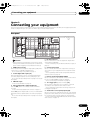
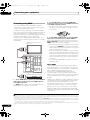
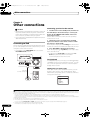
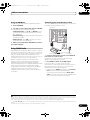
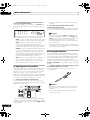
1 Connect the audio/video outputs on the set-top
box to the TV SAT AUDIO and VIDEO inputs.
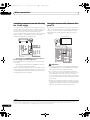
Connect using a stereo RCA/phono jack cable and a
video or S-Video cable.
2 Connect an optical-type1 digital audio output from
your set-top box to the OPTICAL IN 1 (TV SAT) input.2
Use an optical cable for the connection.
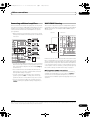
DVR, VCR, etc.
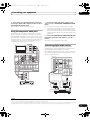
1 Connect the audio/video outputs of the video
player/recorder to the DVR1 AUDIO and VIDEO inputs.
Use a stereo RCA/phono jack audio cable for the audio
connection and a video or S-Video cable for the video
connection.
• For a second recorder, use the DVR2 IN inputs.
2 If the device can record, connect the DVR1 AUDIO
and VIDEO outputs to the recorder’s audio/video
inputs.
Use a stereo RCA/phono jack audio cable for the audio
connection and a video or S-Video cable for the video
connection.
• For a second recorder, use the DVR2 OUT outputs.
Note
1 If your set-top box only has a coaxial digital output, you can connect it to one of the coaxial inputs on this receiver using a coaxial digital audio cable.
When you set up the receiver you’ll need to tell the receiver which input you connected the set-top box to (see The Input Setup menu on page 69).
2 If your satellite/cable receiver doesn’t have a digital audio output, you can skip this step.
18
En