1
Chapter 3 - AT Commands
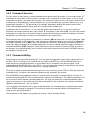
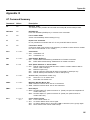
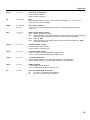
3.13 Escape Sequences
Escape sequences (escape codes) cause the modem to enter command mode from online mode without
disconnecting the call. There are two local escape sequences used by the modem, +++AT<CR> and
<BREAK>AT<CR>, and one remote escape sequence, %%%AT<CR> (see “Remote Configuration”).
+++AT<CR>
In-Band Escape Sequence
When the modem is online with a remote modem, enter command mode (without
disconnecting the call) by typing this escape code. The default escape code is three plus
signs (+++) followed by the letters AT, up to 10 command characters and ENTER. The
modem escapes to command mode, executes the command (if any), then remains in
command mode.
<BREAK>AT<CR> Out-of-Band Escape Sequence
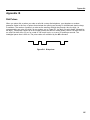
An alternate escape method uses a break signal as the escape code. The break signal is
ten or more zero bits issued by data communications software. This allows the DTE to
signal the modem without the modem interpreting data characters as modem control
characters. The break signal is followed by the letters AT, up to 60 command characters,
and ENTER. The modem executes the command and immediately returns to online mode,
unless the command is to hang up and/or reset the modem (an H or Z command). In the
latter case, the modem escapes to command mode after executing the H or Z command.
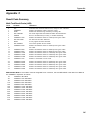
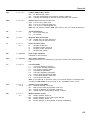
%En
Escape Sequence Options
n = 0–5
Defaults: %E1 and %E4
Optional settings cause the modem to respond to the <BREAK> method, or respond to
either the +++ or the <BREAK> methods, or for the modem to ignore both methods and not
escape. The %E command is used to select these options as follows:
%E0
Modem doesn’t escape
%E1
+++ AT<CR> escape method (factory default).
%E2
<BREAK> escape method.
%E3
Either +++ or <BREAK> escape methods.
%E4
Disables OK response to +++ (factory default).
%E5
Enables OK response to +++.
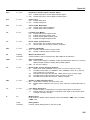
%E1 %E5
Enables +++ method and OK responses to +++.
%E3 %E5
Enables +++ or <BREAK> method and OK responses to +++.
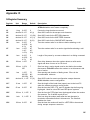
A
Force Answer Mode
Use the A command to force the modem into answer mode. Type ATA when in command
mode to immediately bring the modem off-hook, out of command mode and into online
answer mode, transmitting the carrier signal over the phone line. If no responding carrier
tone is received within forty-five seconds (or by the time you have specified in register S7),
the modem stops transmitting and hangs up, returning to command mode.
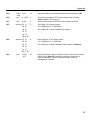
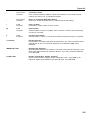
O
Go Back Online
Use the O command to bring the modem out of command mode and back into online mode.
The O command reverses the result of entering the escape code. The O command brings
the modem into whichever online mode (originate or answer) that it was in prior to entering
command mode.
52