1
01-12_EN
6/26/03 2:41 PM
Page 4
Y O U R N E W TV
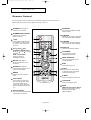
Remote Control
You can use the remote control up to a distance of about 23 feet from the TV.
When using the remote, always point it directly at the TV.
POWER (See Page 13)
ADD/DEL
Turns the TV on and off.
Use to store and delete channels
to/from memory.
NUMBER BUTTONS
P.MODE
Press to select channels
directly on the TV.
Adjusts the TV picture by selecting
one of the preset factory settings.
1
+100
Press to select channels over 100.
For example, to select channel
121, press “+100,” then press
“2” and “1.”
3
Press CH
channels.
4
to change
VOL+ and VOLPress to increase or
decrease the volume.
MUTE (See Page 14)
Press to temporarily cut off
the sound.
Adjust the TV sound by selecting
one of the preset factory settings.
PRE-CH
CH and
CH
(Channel Up/Down)
or CH
S.MODE
2
13
Tunes to the previous channel.
TV/VIDEO
5
14
Press to display all of the
available video sources.
6
15
INFO DISPLAY
7
16
Use to see information on the
current broadcast.
EXIT
8
Press the menu to exit.
SLEEP(See Page 32)
Press to select a time for the TV
to turn off automatically.
MENU
Displays the main on-screen
menu.
STILL
9
10
11
12
17
18
19
20
Press to stop the action during
a particular scene. Press again
to resume normal video.
P.SIZE
Press to change the screen size.
JOYSTICK
Use to select on-screen menu
items and change menu values.
(The remote control will only
function with VCR or DVD units
that are compatible with the LCD
TV.)
CAPTION
Press to set caption on/off.
MTS
(Multichannel Television Stereo)
Press to choose stereo, mono or
Separate Audio Program
(SAP broadcast).
AUTO PROG.
Use to store the broadcast/cable
channels that you receive.
English-4