1
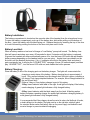
Battery Care:
Do not carry batteries in your pocket where they may come in contact with metal, resulting in a quick
discharge and possible fire.
Disposing of Batteries:
Old batteries may be returned to WT or disposed of at any battery recycling station.
Headset Cleaning:
Wipe the exterior of the headset with a soft cloth dampened with a mild cleaning solution. Do not
immerse the headset in water.
•
Ear foams are replaceable.
•
Microphone boom port foam ovals are replacable. Dirty foam can negatively affect noise
canceling functions
Tone Descriptions:
Vehicle Detected (Hands Free)
Vehicle Detected (Auto Hands Free)
Low Battery
Headset Registered
Headset Not Registered
Volume Up/Down
Minimum/Maximum Volume
Page
Tap/Talk
Power on sound
Mode Options
Listen Only
Repeating Beep, every second
Single Beep, microphone opens
“Low Battery”
“Headset Connected” voice prompt
“Headset not connected” voice prompt
2 step tones, increasing volume for up,
decreasing for volume down
“Minimum” or “Maximum” voice prompt
“Page”
Quick short tone/chirp for ON, Double tone/chirp
for mute
Either “Headset connected or “out of range”
Voice Prompt: “Push to talk”, “Hands Free”, “Auto
Hands Free” or “Speed Team”
Voice Prompt: “Listen Only” repeated if center
button is touched.
Light Descriptions
Red LED flashes in boom
Red LED solid in boom
Power light on the battery side
vehicle detected, muted microphone
vehicle detected, microphone is “LIVE”
Unit on
Technology,
Inc. www.wentworthtechnology.com
877.495.1634
WentworthWentworth
Technology,
Inc. www.wentworthtechnology.com
877.495.1634
17
17