1
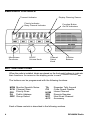
[MON] Monitor Squelch Noise
Press the MON button to start or stop monitoring squelch noise. This allows
you to set a comfortable volume level.
[SCN] Channel Scan
Press the SCN button to start or stop scanning channels in the scan list.
Channel Scan operation occurs only during receive operation. To add or
delete the current channel from the scan list, press the SCN button and hold
it down for 1 second or more. See "Channel Scan" on page 10.
[PRI] Priority Scan
Press the PRI button to start or stop priority scanning. Priority Scan operation
occurs only during receive operation. The PR annunciator, and either the
flashing SCN annunciator (alphanumeric mode) or two flashing bars
(numeric mode) appear on the display. To make the current channel the
fixed priority channel, press the PRI button and hold it for 1 second or more.
See "Priority Scan" on page 11.
[PA] Public Address
Press the PA button to turn the Public Address system on or off. When PA
is on, pressing the microphone PTT switch causes audio to be routed to the
audio amplifier without enabling the transmitter.
[HOM] Home Channel
Press the HOM button to go directly to the pre-programmed home channel.
To set a different Home Channel, select the desired channel using the Channel
Select knob, press the HOM button, and hold it for more than 1 second until
the arrow above the HOM button appears on the display. The new
channel then becomes the Home Channel.
EMH Owner’s Manual
5