1
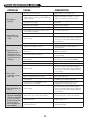
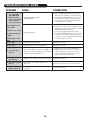
PROBLEM
15. E 2, Err – 1002, Err –
102 = Control valve
motor ran too short
and was unable to
find the next cycle
position and stalled
CAUSE
CORRECTION
D. Improper voltage being delivered to PC board
D. Verify that proper voltage is being supplied.
Press NEXT and REGEN buttons for 3 seconds
to resynchronize software with piston position
or disconnect power supply from PC board for
5 seconds and then reconnect.
E. Valve type is programmed incorrectly
E. Verify valve body and program PC board
to match
A. Motor failure during a regeneration
A. C
heck motor connections then Press NEXT and
REGEN buttons for 3 seconds to resynchronize
software with piston position or disconnect
power supply from PC board for 5 seconds
and then reconnect.
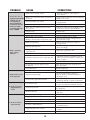
16. E3,
Err – 1003, Err –
B. Foreign matter built up on piston and stack
103 = Control valve
assemblies creating friction and drag enough
motor ran too long and
to time out motor
was unable to find the
next cycle position
C. Drive bracket not snapped in properly and out
enough that reduction gears and drive gear do
not interface
17. E4, Err – 1004, Err –
104 = Control valve
A. Drive bracket not snapped in properly and out
motor ran too long
enough that reduction gears and drive gear do
and timed out trying
not interface
to reach home position
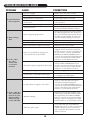
A. Control valve programmed for ALT A or B,
nHbP, SEPS, or AUX MAV with out having
a MAV or NHBP valve attached to operate
that function
18. Err
-1006, Err – 106,
Err - 116 = MAV/
SEPS/ NHBP/ AUX
MAV valve motor ran
too long and unable
to find the proper
B. MAV/NHBP motor wire not connected to
park position
PC board
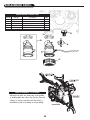
Motorized Alternating
Valve = MAV
Separate Source = SEPS
No Hard Water Bypass
= NHBP
uxiliary MAV = AUX
A
MAV
B. R
eplace piston and stack assemblies. Press
NEXT and REGEN buttons for 3 seconds to
resynchronize software with piston position
or disconnect power supply from PC board
for 5 seconds and then reconnect.
C. Snap drive bracket in properly then Press
NEXT and REGEN buttons for 3 seconds to
resynchronize software with piston position
or disconnect power supply from PC board
for 5 seconds and then reconnect.
A. Snap drive bracket in properly then Press
NEXT and REGEN buttons for 3 seconds to
resynchronize software with piston position
or disconnect power supply from PC board
for 5 seconds and then reconnect.
A. P
ress NEXT and REGEN buttons for 3 seconds
to resynchronize software with piston position
or disconnect power supply from PC board for
5 seconds and then reconnect. Then reprogram
valve to proper setting
B. C
onnect MAV/NHBP motor to PC board two
pin connection labeled DRIVE. Press NEXT and
REGEN buttons for 3 seconds to resynchronize
software with piston position or disconnect
power supply from PC board for 5 seconds
and then reconnect.
C. M
AV/NHBP motor not fully engaged with
reduction gears
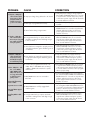
C. P
roperly insert motor into casing, do not force
into casing Press NEXT and REGEN buttons for
3 seconds to resynchronize software with piston
position or disconnect power supply from PC
board for 5 seconds and then reconnect.
D. Foreign matter built up on piston and stack
assemblies creating friction and drag enough
to time out motor
D. Replace piston and stack assemblies. Press
NEXT and REGEN buttons for 3 seconds to
resynchronize software with piston position
or disconnect power supply from PC board
for 5 seconds and then reconnect.
15