1
TX-SR502_En.book Page 56 Tuesday, February 17, 2004 12:14 PM
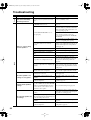
Troubleshooting
Power
Symptom
The TX-SR502/TX-SR502E
shuts down immediately
after being turned on?
Possible cause
Remedy
The amp protection system has been activated.
Contact your Onkyo dealer.
The TX-SR502/TX-SR502E is muted and
the MUTING indicator is on.
Unmute the TX-SR502/TX-SR502E
(page 39).
Make sure that all audio connecting plugs are
pushed in all the way. And make sure that the
inputs and outputs of all components are connected properly (page 20).
The TX-SR502/TX-SR502E is not connected properly.
If your turntable doesn’t have a built-in
phono preamp, you must connect one
between your turntable and the TX-SR502/
TX-SR502E.
If your turntable uses an MC cartridge, you
must use a compatible phono preamp.
The speaker cables are not connected
properly.
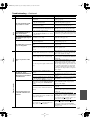
Audio
There’s no sound coming
from the speakers?
Make sure that the polarity of the speaker
cables is correct and that the bare wires are in
contact with metal part of each speaker terminal (page 17).
The wrong input source is selected.
Select the correct input source (page 34).
A pair of headphones are connected.
Disconnect the headphones (page 39).
The input signal format is set to PCM or
DTS.
Set the input signal format to Auto (page 47).
The volume is set at minimum.
Turn up the volume (page 34).
The speakers are configured incorrectly.
Specify which speakers are connected
(page 32), the speaker distances (page 48)
and adjust the individual speaker levels
(page 49).
Check the digital audio output setting on the
The source component is not outputting dig- connected device. On some games consoles,
ital audio.
such as those that support DVD, the default
setting is off.
A compatible digital audio format is not
selected on the source component.
With some DVD-Video discs, you need to
select an audio output format from a menu.
The Stereo, Direct, Pure Audio, or Orchestra The center speaker is not used with these
listening mode is selected.
modes (page 42).
The center speaker is not
working or is very quiet?
Only the center speaker is
working?
The level of the center speaker is set at
minimum.
Check the volume of the center speaker
(page 49).
The Center setting is set to None in the
Speaker Configuration.
Check the Center setting in the Speaker Configuration (page 32).
You’re listening to a mono sound source
(e.g., TV or AM broadcast) and the PL II/PL
IIx Movie or PL II/PL IIx Music listening
Select another listening mode (page 42).
mode is selected, so the sound is concentrated in the center speaker.
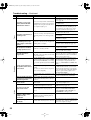
When the Stereo, Direct, or Pure Audio lisSelected listening mode doesn’t use surround
tening mode is selected, the surround speakspeakers.
ers produce no sound (page 42).
The surround speakers are
not working?
56
Surround speaker output depends on the
source material, and some material may not
use the surround speakers much.
The level of the surround speaker is set at
minimum.
Check the volume of the surround speaker
(page 49).
The Surround setting is set to None in the
Speaker Configuration.
Check the Surround setting in the Speaker
Configuration (page 32).