1
COnfigurations
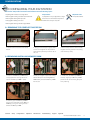
3.3 Changing or re-installing a pci card
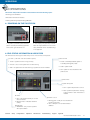
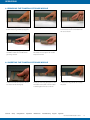
1. Use a Philips screwdriver to remove
t h e a t t a c h m e n t s c r e w s to t h e s m a l l,
black retainers located around the card.
Remove retainers with your fingers.
2. Using a Philips screwdriver, remove
the attachment screws from the card
placeholder plate.
3. Carefully and gently pull the PCI card
away from the unit. Be very careful not
to bend or t wist the card as damage
may occur.
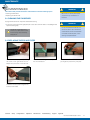
4. Using a Philips screwdriver, remove
the attachment screw for the selected
placeholder plate. Remove the plate and
install your PCI card.
5. After installing and securing your other
PCI card, carefully reposition the existing
PCI card back into its former location.
6. Re-at tach the PCI card to the card
placeholder plate. Restore and attach the
black retainers from Step 1, above to the
sides of the card.
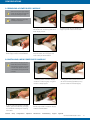
3.4 re-installing top cover of zx2 station
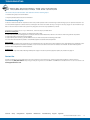
1. Place cover loosely onto ZX2 station.
When placed on the station, make sure
your side flanges properly align with the
corresponding slots.
Contents
Setup
Configurations
Operations
2. Using one thumb push slightly down
on the front edge of the top and the other
hand to push the top cover from the rear
or the unit.
Maintenance
Troubleshooting
Support
3. When the top is firmly seated onto the
station casing, turn the attachment screws
at the rear of the top cover to secure .
Appendix
Doc# 27-0041UM Rev B Issued 7/13/2012
9