1
OTHER CONVENIENT FEATURES
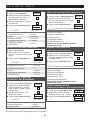
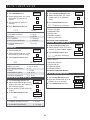
TIMER/CLOCK
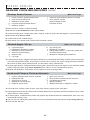
DEMONSTRATION MODE
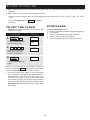
To demonstrate, touch Timer/Clock, the number 0 and
then touch Start/Touch On pad and hold for 3 seconds.
. .DEMO
ON DURING DEMO NO OVEN POWER will appear
in the display. Cooking operations and specific special
features can now be demonstrated with no power in the
oven. For example, touch Minute Plus pad and the display will show. 1.00 and count down quickly to END .. .
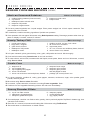
• Suppose you want to time a 3-minute long distance
phone call.
PROCEDURE
D I S P L AY
TO SET
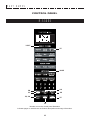
Timer
Clock
1
Touch Timer/Clock pad. KITCHEN
TIMER
1
2
PRESS 1
To cancel, touch Timer/Clock, then the number 0 and
Stop/Clear pads. If easier, unplug the oven from the electrical outlet and replug.
ENTER
TIME
MINUTE PLUS
Touch number 1 pad.
3
3
0
0
3.00
TIMER
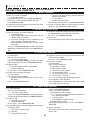
Minute Plus allows you to cook for a minute at 100% by
simply touching the Minute Plus pad. You can also extend cooking time in multiples of 1 minute by repeatedly
touching the Minute Plus pad during manual cooking.
PRESS
TIMER
Enter time.
4
5
Timer
Clock
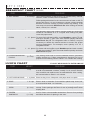
• Suppose you want to heat a cup of soup for one
minute.
Touch Timer/Clock pad.
The Timer will count down.
After the Timer cycle ends, the
display will indicate the
following message.
PROCEDURE
Touch Minute Plus pad.
TIMER IS
FINISHED
Minute
Plus
NOTE:
NOTE:
To cancel the Timer during programming, touch the
Stop/Clear pad.
1. To use Minute Plus, touch pad within 1 minute after
cooking, closing the door, touching the Stop/Clear
pad or during cooking.
HELP
2. Minute Plus cannot be used with Sensor Cooking,
Let's Cook or Keep Warm Plus.
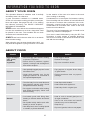
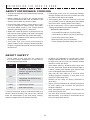
Each setting of Sensor Cooking provides a cooking hint.
If you wish to check, touch CUSTOM HELP pad whenever HELP is lighted in the Interactive Display for these
hints.
28