1
COOL , HEAT, and FAN ONLY Operation
1. If the AUTO mode is not comfortable , you may manually override
the settings by using COOL, DRY, HEAT( HEAT PUMP units only),
or FAN ONLY modes.
2. Push the
or button to set the desired room temperature.
When in COOLING mode, the most comfortable settings are 21 C
or above. When in HEATING mode, the most comfortable settings
are 28 C or below.
3. Push the Fan button to select the FAN mode of AUTO, HIGH,
MED or LOW.
4. Push the On/off button. The operation lamp lights and the air
conditioner starts to operate per your settings. Push the On/off
button again to stop this unit operation.
1
2
COOL
DRY
HEAT
FAN
NOTE: HEAT only for Heat Pump
3
4
5
DRY OPERATION
1. Push the Mode button to select DRY.
2. Push the or button to set the desired temperature from
21 C to 28 C.
3. Push the On/off button. The operation lamp lights and the air
conditioner starts to operate in the DRY mode. Push the On/off
button again to stop this unit operation.
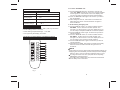
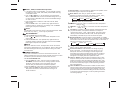
Mode Button: Each time you press the button, a mode is
selected in a sequence that goes from AUTO COOL DRY
HEAT and FAN only as the following figure indicates:
AUTO
NOTE
The FAN ONLY mode cannot be used to control the temperature. While
in this mode, only steps 1 3 and 4 may be performed.
On/off Button: Push this button to start the unit operation. Push
the button again to stop the unit operation.
6
Button : Push the button to increase the indoor temperature
setting to 30 .
Button : Push the button to decrease the indoor temperature
setting to 17 .
Fan Button: This button is used for selecting Fan Speed. Each time
you press the button, a fan speed is selected in a sequence
that goes from AUTO LOW MED to HIGH, then back to Auto.
When you select the AUTO or DRY mode, the fan speed will be
automatically controlled and you can not set the fan speed.
Sleep/Turbo Button: Press this button to select SLEEP or TURBO
mode. Each time you press the button, the operation mode is shifted in
the direction of the arrow. When the operation mode is either DRY or
FAN only, this function can not be used.
SLEEP
SLEEP OFF
TURBO
TURBO OFF
NOTE
Due to the difference of the set temperature of the unit and the
actual indoor temperature, the Air Conditioner when in DRY mode
will automatically operate many times without running the COOL
and FAN mode.
7
8
TIMER OPERATION
Push Timer on/off button to set the on and off times of the unit. The
effective operation time set by the remote controller for the timer function
is limited to a period of between 0.5 and less than 24 hours.
9
1. To set the STARTING time.
1.1 Push the Timer on button, then the remote controller shows
ON TIMER , the last set time for the starting operation and the
signal "Hr" will be shown on the Timer display area. You
are now ready to reset the time to START the operation.
1.2 Push the Timer on button again to set desired unit start time.
1.3 After setting the Timer on ,there will be a one-half second
delay before the remote controller transmits the signal to
the air conditioner.
5
10
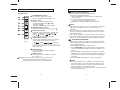
Swing Button: Press the SWING button to activate the swing
feature. Push the button again to stop.
Air direction Button: Press this button to change the swing
angle of the louver. The swing angle of the louver is 6oC for
each press. When the louver swing at a certain angle which
would affect the cooling and heating effect of the air conditioner,
it would automatically change the swing direction . No symbol
will appear in the display area when press this button.
Timer on Button: Press this button to initiate the auto-on time
sequence. Each press will increase the auto-timed setting in 30
minutes increments. When the setting time displays 10Hr, each
press will increase the auto-timed setting 60 minutes increments.
To cancel the auto-timed program, continue pressing the button
until nothing displays.
Timer off Button: Press this button to initiate the auto-off time
sequence. Each press will increase the auto-timed setting in 30
minutes increments. When the setting time displays 10Hr, each
press will increase the auto-timed setting 60 minutes increments.
To cancel the auto-timed program, continue pressing the button
until nothing displays.
2