1
Using
theControls
- Speed
Select
Models
Wrinkle Free Fabrics/Delicates
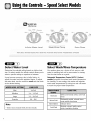
Select Cycle
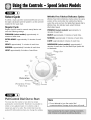
To select a cycle, push the control dial IN and turn it to
the right (clockwise) until the pointer is at the soil level
needed for the wash load.
select the cycle and turn the Wash/Spin Speed dial to
Wrinkle Free. For delicate loads, select Delicate
Regular Cycle
Wash/Spin
Regular Cycle is used for normal, sturdy fabrics and
uses the following settings:
PREWASH [select models):
minutes of wash time.
PREWASH [select models):
minutes of wash time.
HEAVY: approximately
approximately
16
NORMAL:
EXTRA HEAVY: approximately
time.
HEAVY: approximately
NORMAL:
LIGHT: approximately
Speed.
approximately
14
13 minutes of wash time.
approximately
12 minutes of wash time.
13 minutes of wash
11 minutes of wash time.
approximately
Cycles
Wrinkle Free Fabrics/Delicates
Cycles share the same
portion of the control dial. For wrinkle free fabrics,
8 minutes of wash time.
LIGHT: approximately
9 minutes of wash time.
HANDWASH
[select models): approximately 6
minutes of wash time. Set the Wash/Spin Speed dial
to Handwash.
6 minutes of wash time.
Pull ControJ Dial Out to Start
You may stop the washer at any time by simply
pushing the control dial IN. Therefore it is possible to
obtain a non-agitated soak or to shorten, skip or
repeat any part of a cycle. The control dial must be
pushed IN (off position} when you change the setting.
Note
• Do not attempt to turn the control dial
counterclockwise.
Damage to the timer will result.