1
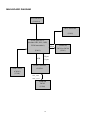
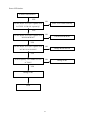
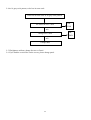
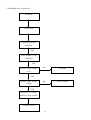
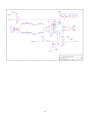
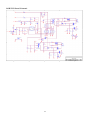
Software Flow Chart
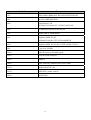
ACER 17” flow chart item description:
1.
2.
3.
4.
5.
6.
7.
8.
9.
10.
11.
12.
13.
14.
(1)
MCU initialize.
Is the EEProm blank?
Program the EEProm by default values.
Get the user value and mode setting from EEProm.
Are the factory key pressed?
Enter factory mode.
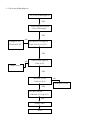
Check the analog port, are there any signal coming?
Display “No Signal” message.
Enter sleep mode.
Wake up the scalar.
Program the scalar to be able to show the coming mode.
Turn on the LED and set it to green color.
Process the OSD display
Read the keyboard. Is any key pressed?
(2)
Y
(3)
Y
(6)
No
(8)
No
(4)
(5)
No
(7)
Y
(10)
(9)
(11)
(12)
(13)
(14)
No
11
Y