1
4. Operating procedures
Operating procedures (auto start operation)
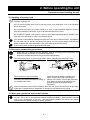
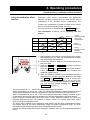
When you want to
correct set temperature or set time, or
change settings
When you want to change the set temperature during timer counting,
press the ▼▲ keys during that status to switch the set temperature
screen to the set temperature input mode, which blinks to enable
change of the set temperature with the ▼▲ keys.
When you want to change the set time during timer counting, press
the TIMER key during that status to switch the set temperature
screen to the set time input mode, which blinks to enable change of
the set time with the ▼▲ keys.
In either case, the set temperature screen will stop blinking after a
while and switche to the timer count mode and the change made is
determined. Note, however, when you change the set time you need
to set a time calculated by adding the time already passed to the time
to be added.
When operation has started after the auto start time, you cannot
change the set time.
When you want to stop auto start operation in the middle of it, press
the RUN/STOP key long to stop device control once, then make
settings again in the appropriate mode.
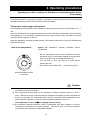
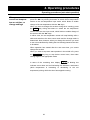
In terms of the remaining time display
a blinking dot
indicates count down and an illuminating dot indicates a wait status
(while temperature is increasing or decreasing to the set
temperature) during which the timer has stopped counting.
22