1
will not respond turn the gain down 5 dB and move the outside
antenna. Continue to adjust the gain and the antenna position
until the light turns blinking green. Contact Wilson Electronics
Technical Support Team for assistance: 507-282-8484.
3. Solid Red
If either of the two lights on the signal booster are solid red,
this indicates that the signal booster has shut down on that
frequency to prevent an oscillation (feedback). First, make
sure that all the connections are tight. Then reduce the
gain of the booster in small increments by rotating the gain
control, counter clockwise, waiting 5 seconds between each
adjustment for the booster to reset. Continue this adjustment
until the light turns blinking or solid green. When you are
turning down the gain, you are reducing the inside coverage
area. If the amount of coverage area is sufficient for your
needs and the light is green the installation is complete. If the
coverage area is not large enough, it is necessary to increase
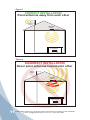
the separation distance of the antennas by moving them
horizontally or vertically farther apart, or both. Then increase
the gain until the red light comes on, and then slightly keep
decreasing the gain until the green or blinking green light
appears. If after separating the antennas your coverage area
is still too small, contact Wilson Electronics Technical Support
Team for assistance: .
If your installation takes longer than 15 minutes, it is possible
to re-enter the installation mode by disconnecting and
reconnecting the power supply from the signal booster.
Note: For AG Pro Installer, if you see a solid red light, only use
the downlink (DL) gain controls. Leave the uplink (UL) gain
controls at maximum.
4. SOLID Green
The indicator lights on the signal booster will be a solid green
after the first 15 minute installation period, if the unit is powered
up and working properly.
13
Contact Wilson Electronics Technical Support Team with any questions at 507-282-8484
or email: tech@wpsantennas.com. Hours: 7 am to 6 pm MST.