1
Changing the Beep Sound Volume
(VOL. SETTINGS)
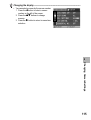
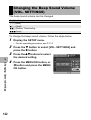
The beep sound volume can be changed.
Available Settings
FFF (Mute)
JFF (Small)
JJF (Medium) *Default setting
JJJ (Large)
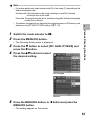
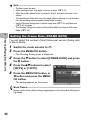
To change the beep sound volume, follow the steps below.
1
Display the SETUP menu.
• For the operating procedure, see P.114.
5
Changing Camera Settings
122
2
Press the " button to select [VOL. SETTINGS] and
press the $ button.
3
Press the !" buttons to select
the desired setting.
4
Press the MENU/OK button, or
# button and press the MENU/
OK button.