1
Fault Isolation
3. Fault Isolation
This section contains information used to troubleshoot faults in the system. It contains the following subsections:
● Component Status LEDs
●
System component LEDs
●
System Log and Status Messages
●
Component Status
●
Fault Codes
●
Troubleshooting Procedures
3.1 Component Status LEDs
3.1.1 General LED information
LEDs can be in a three color arrangement, a two color arrangement or simply a green light. General explanations or
these categories follow.
3.1.1.1 Three color LED arrangements
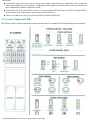
Component status LEDs are either red, green, or yellow. (There is also an amber, system-wide status LED labeled
CABINET FAULT at the top of the cabinet in the front and rear.) When grouped in threes, they are arranged as
follows: red on top, yellow in the middle, green on the bottom.
They have the following general meanings:*
●
●
●
A red light indicates that the component is not functioning properly. In most cases, the component is broken and
needs to be replaced.
A yellow light indicates that the component is simplexed--that is, operating without a partner. Do not remove
this component. The yellow light is illuminated when the component is in the process of configuring itself with
its partner or when its partner has failed. Yellow LEDs can also indicate that a component is performing a
self-test.
In most cases, removing a yellow-lit part from the system causes its function to be suspended
(except in the PCI card cage on HP-UX systems).
A green light indicates that the component is operating properly
* The Tray 1 rectifier LED configuration is green/green/red, as explained in section 3.2.1.2.
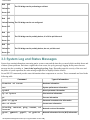
A given status LED can also flash or remain steadily lit in combination with another status LED to indicate other
operating conditions, such as system power-up.
3.1.1.2 Two color LED arrangements
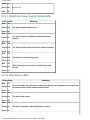
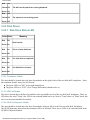
The disk drives and disk power supplies in the disk shelf (PSU0 and PSU1) have only two LEDS, red and green. When
a status light is illuminated, it indicates one of the following conditions:
● a red and green light indicates a fault with the disk power supply.
● a red light indicates a fault with the disk drive.
● a green indicates that the system is operating properly.
3.1.1.3 Single LEDs
file:///H|/CSDoc/leotsg/section3.html (1 of 12) [01/12/2000 11:50:41 AM]