1
User’s Manual—SNAP™ 700 Printer
43
4.3 Print and Cut Adjustments
The print and cut adjustments allow you to compensate for mechanical
tolerances in the printer.
4.3.1 Cut Adjust
NOTE: The cut adjust should only be made when using preprinted stock (see section 3.3.6). If the cut adjust is changed
when you are using blank stock, the print will appear to move
on the label.
If you use pre-printed stock, do the cut adjust using the preprinted stock and then do the print adjust using either preprinted or blank stock.
If you never use pre-printed stock, set the cut adjust to zero.
The cut adjust allows you to adjust the cut position so that it cuts in the right
place with relation to the sense mark on pre-printed stock.
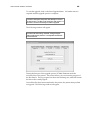
Adjust cut using the Virtual Control Panel (sec. 8.0) in PCMate Platinum on the
Options tab.
When the cut adjust is set correctly, the printer will cut the label at the leading
edge of the sense mark. If the cut is not in the right place, increase the cut adjust
value to move the cut to the right (looking at the printer) or decrease the value to
move the cut to the left. Each step is 0.003”/0.076mm.
4.3.2 Print Adjust
The print adjust allows you to move the print with relation to the cut. There are
two print adjusts, one for the top print station and one for the bottom print
station.
Adjust cut using the Virtual Control Panel (section 8.0) in PCMate Platinum on
the Options tab.
The best way to set the print adjust is to use Test Pattern 1 (see section 3.4.1). The
test pattern has a line printed across the stock that is 1” from the cut. Run a few
labels and measure the distance from the cut to the line. Then increase the print
adjust value to move the print to the right, or decrease the print adjust value to
move the print to the left. Each step is 0.003”/0/076mm. Repeat until the line is
in the correct place.
NOTE: Some operators use the print and cut adjusts to “finetune” a format. If done this way, the operator will have to fine
tune each format. A better approach is to correct any print
position problems in the format, and to use the Sense To Cut
option to move the cut if necessary. Refer to the PCMate
Platinum manual for details.