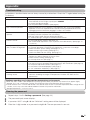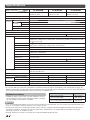
1
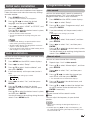
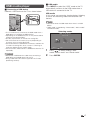
Audio menu
ECO menu
Setup
ECO
Audio
ECO
No signal off
STANDARD
[
0 ] –15
+15
Bass
[
0 ] –15
+15
No operation off
Balance
[
0 ]
R
Ecology
SRS TS HD
[Off ]
Bass enhancer
[ On]
Reset
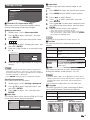
H Audio adjustments
Selected item
Treble
Bass
Balance
c button
For weaker treble
For weaker bass
Decrease audio
from the right
speaker
d button
For stronger treble
For stronger bass
Decrease audio
from the left
speaker
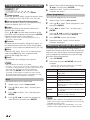
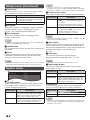
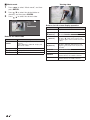
H SRS TruSurround (TS) HD™
You can enjoy SRS TruSurround HD™ sound, the
same as you were in movie theatre.
Using SRS TS HD on the menu screen
You can produce SRS TruSurround HD™ effects from
the “Audio” setting.
Selected item
Description
SRS TruSurround HDTM creates a high
quality surround sound experience, when
watching DVD movies and TV programmes
broadcast in surround sound.
Outputs the normal sound.
On
Off
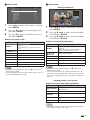
H Bass enhancer powered by SRS Labs, Inc.
This function allows you to enjoy bass-enhanced
sound.
Selected item
Description
On
Bass enhancer function is on.
Off
Outputs the normal sound.
NOTE
• For resetting all Audio adjustment items to the factory
preset values, press a/b to select “Reset”, press
ENTER, press c/d to select “Yes”, and then press
ENTER.
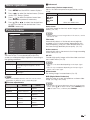
Option
[Disable]
4 Power management
Treble
L
Setup
[Disable]
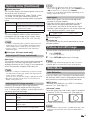
H No signal off
You can set the TV to automatically power off in
about 15 minutes after the TV goes into a state of
receiving no programme signals, such as the end of
a broadcast day. (Enable, Disable)
• Five minutes before the power shuts down, the remaining
time displays every minute.
NOTE
• “Disable” is the factory preset value.
• When a TV programme finishes, and the TV receives signal
input, this function may not operate.
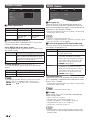
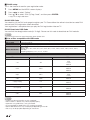
H Power management (PC input mode only)
You can set the TV to automatically power off when
no image is displayed on PC.
Selected item
Description
Off
• No power management
• Factory preset value.
Mode1
• If no signal inputs for approximately
8 minutes, the power shuts down.
• Even if you start using the PC and the
signal inputs again, the TV stays off.
• The TV turns on again by pressing
POWER. (See page 8.)
Mode2
• If no signal inputs for approximately
8 seconds, the power shuts down.
• When you start using the PC and the
signal inputs again, the TV turns on.
• The TV turns on again by pressing
POWER. (See page 8.)
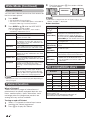
H No operation off
You can set the TV to automatically power off when
no TV operation is performed for more than 3 hours.
(30min., 3hr., Disable)
• Five minutes before the power shuts down, the remaining
time displays every minute.
NOTE
• “Disable” is the factory preset value.
H Ecology
When set to “Yes”, the TV activates the following
power saving mode.
•
•
•
•
•
“OPC” set to “On” (Page 11)
“No signal off” set to “Enable” (Page 12)
“Power management” set to “Mode1” (Page 12)
“No operation off” set to “3hr.” (Page 12)
“Quick start” set to “Off” (Page 14).
NOTE
• Ecology mode cannot be deactivated by selecting “No”.
Each setting must be changed individually to deactivate
Ecology mode.
12