1
M-84PRO Quick Guide
Pg 21
M-84PRO Quick Guide
Pg 2
Installation
PRINT-OUTS
Vector Fonts
Rotation
Graphics
Proportional or Fixed Spacing
Font Size 50 x 50 dots to 999 x 999 dots
Helvetica, 10 Font Variations
0º , 90º , 180º , and 270º Rotation
Dot addressable, SATO Hex/Binary, BMP or PCX formats
SPECIFICATION
M-84PRO All Models
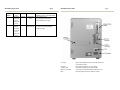
CONTROLS AND INDICATORS
Power
Green LED
On-Line
Green LED
Label
Red LED
Ribbon
Red LED
Error
Red LED
LCD Panel
2 Line x 16 Character
Label Feed
Front Panel
Power On/Off Switch
Front Panel
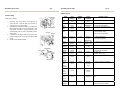
POTENTIOMETER ADJUSTMENTS
Print Darkness
Front Panel
Offset
Front Panel
Pitch
Font Panel
Display
Front Panel
INTERFACE CONNECTIONS
Parallel
IEEE1284 Standard
Serial
RS232C (9600 to 57600 bps) Standard
RS422/485 (9600 to 57600 bps) Optional
Ready/Busy or X-On/X-Off Flow Control
Bi-directional Status
Universal Serial Bus
USB Ver. 1.1 Standard
Ethernet
10/100 BaseT
PROCESSING
CPU
32 Bit RISC
Flash ROM
2 MB
SDRAM
16 MB
Receive Buffer
2.95 MB
Memory Expansion
See Options and Accessories
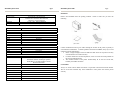
Remove the M-84PRO from the packing container. Check to make sure you have the
following:
Quick Guide
Careful consideration must be given when selecting the location of the printer, especially to
environmental considerations. To obtain optimum results from M-84PRO, always try to avoid
operation locations influenced by:
• Direct or bright sunlight, as this will make the label sensor less responsive and may
cause the label to be sensed incorrectly.
• Locations which have extreme temperature, as this can create electrical problems on
the circuits within the printer.
• The installed location of the printer should ideally be in areas free from dust,
humidity and sudden vibrations.
Consumables
Always use SATO carbon ribbons and labels or equivalent in the thermal transfer models.
The use of incorrect materials may cause malfunctions of the printer and void the printer
warranty.