1
Installation
3
Removing the Fascia
Remove the fascia of the Quaestor-SZU Releasing Fire Control Panel prior to the mounting process to
prevent damage to circuit board components.
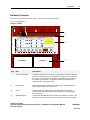
To remove the fascia from the cabinet-box of the Quaestor-SZU Releasing Fire Control Panel:
1
Remove the two mounting-screws on the fascia that secure it to the cabinet-box.
2
Remove the ground connection from the fascia.
3
Remove the fascia from the cabinet-box and place it in a safe location while mounting the cabinet-box.
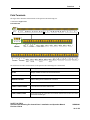
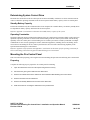
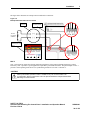
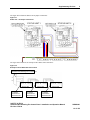
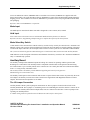
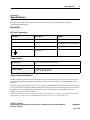
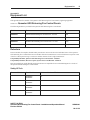
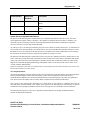
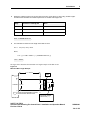
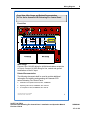
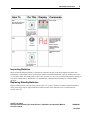
The figure below illustrates the location of the fascia mounting-screws:
Figure 1-1
Fascia Mounting-Screws
Fascia Mounting-Screws
N
L
FUSE
R0V
E
24V DC
AUX
24V
SIL
AL FLT RST
REMOTE
CONTROL
NC
DATA
POWER
STATUS UNITS
General System Status
Mains
Fail
Power Trouble
Power On
NAC Trouble/
Disabled
Delay On
General Trouble
Test Mode On
System Trouble
General
Disablement
Buzzer Silenced
CPU
Trbl.
Batt.
Low
1
ZONE 1
ZONE 2
Comms
Trbl.
2
Earth
Trbl.
3
Lamp Test
(+100)
Sys.Fuse
Trbl.
NAC1
Trbl.
ZONE 3
NAC3
C
NO
1ST STAGE
C
NO
NO
MODE
SELECT
MAN.
RELEASE
ABORT
Extinguishant
Released
Manual Release
Release
Imminent
1st Stage Output
1st Stage
Activated
2nd Stage Output
Abort Activated
Extract Fan On
Releasing Trouble
NAC3
Trbl.
Select
(+1)
Exting.
Trbl.
REL PRES.
SWITCH
EXTING.
LOW P.
SWITCH
C
NC
C
NO
EXTRACT TROUBLE RELAY
NC
C
NO
NC
LOCAL FIRE
C
NO
FIRE RELAY
Releasing Status
Extinguishant
Mode
(+10)
NAC2
Trbl.
NC
2ND STAGE
Disablements/
Supervisory
Zone Trouble/
On Test/Disabled
Reset
Silence
Buzzer
Aux.24V
Trbl.
NAC2
Fire In Zone
Fire
Silence/Sound
Alarm
NAC1
Abort
Trbl.
Low
Pressue
Auto &
Manual
Enter
Man.Rel.
Trbl.
Mode
Trbl.
Manual
Extinguishant Release
Manual
Only
Pull Down - Push Button
System Mode
Release
Trbl.
Low
Pres.
Tell
Tale
Terminate
Release
Enable Access
W/Dog
Reset
Processor
Reset
SAFETY HI-TECH
Quaestor-SZU Releasing Fire Control Panel - Installation and Operation Manual
Revision E03.04
Exting.
Mon.
Write
Enable
SHM80001
21 of 155