1
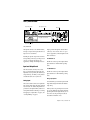
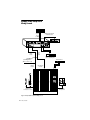
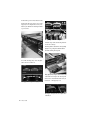
192 I/O Back Panel
Bay 1: Analog In Card
Bay 3: Digital I/O Card
Enclosure
Empty Bay for Optional Card
Bay 2: Analog Out Card
192 I/O Rear Panel
Although the 192 I/O is a 16-channel interface,
it has up to 50 inputs and outputs that can be assigned to Pro Tools channels.
Installing an optional card provides even more
I/O (depending on the card, you will get a total
of 58, 66, or 74 inputs and outputs). See
Appendix A, “Adding or Removing I/O Cards.”
Input and Output Cards
The 192 I/O features four bays for I/O cards.
Bays 1–3 contain Analog In, Analog Out, and
Digital I/O cards, respectively. The fourth bay is
an expansion bay, for which you can purchase
an additional audio card of your choice.
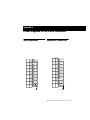
Input is provided through two discrete DB–25
connectors, one for +4 and one for –10 operation. See Appendix B, “Pinout Diagrams for the
DB-25 Connectors.”
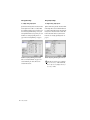
+4 dBu Balanced
This DB–25 connector provides eight balanced
input channels at +4 dBu nominal operating
levels.
–10 dBV Balanced
This DB–25 connector provides eight balanced
input channels at –10 dBV nominal operating
levels.
Analog Input Options
Analog Input
This section contains connectors for eight channels of analog audio input with 24-bit, 192 kHz
A/D converters. Two dedicated Input Trims are
provided for each input channel, and there is a
soft-clip limiter function that helps to avoid digital clipping. See “Input Trims” on page 6, and
“Soft Clip Limiting” on page 23.
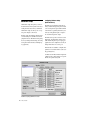
For each channel, you can select input level and
Input Trim settings from within the Hardware
Setup dialog.
When you select an operating level for each input, you are simultaneously selecting which input the signal enters through. This lets you connect sources at both operating levels that are
selectable from within Pro Tools.
Chapter 2: 192 I/O Overview
5