1
To program a preset, tune in the desired station. Push and hold
the desired PRESET button for at least 2 seconds.
Using The CD / MP3 / WMA Player
Seek & Manual Tune:
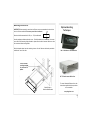
Open the front panel. Insert the disc (label side up!) partially into the slot
and it will be drawn in automatically and play. The DISC IN symbol will
appear and the Play timer will start. Changing the source will stop the CD
deck and leave the disc in the bay. Press the EJECT button to eject or
change the disc.
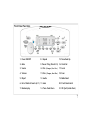
Press the TUNE/SEEK-UP button (15) once to auto-matically tune to the
next higher station.
Press the TUNE/SEEK-DOWN button (14) once to automatically tune to
the next lower station
To manually tune to a frequency, press and hold either TUNE/SEEK
button for 2 Sec. . When the desired station is reached, release the
button. The unit remains in manual tune for 3 sec. So you can still fine
tune. After 3 seconds unit returns to Seek mode.
Scan Function:
Select any AM or FM station and press SCAN (18) to listen to a few
seconds of each station. The display will flash and scan up for the next
station. To stop the scan and listen to the current station press SCAN
again.
The radio remains in the Scan mode until the SCAN button or one of
the TUNE buttons is pressed.
Preset Scan Function:
Press AUTO The radio will scan the station presets for 3 seconds from
low to high. If you wish to remain on the station press SCAN again .
Local /Long Distance Function:
Press the LOCAL button (17) to toggle between local and distant station
mode. In Local mode the strongest stations will be selected during
SEEK or Scan.
Changing Tuner for US or European Frequencies:
The radio is factory set to US frequency steps. For European use disconnect power and reset switch on the bottom of the radio to the European setting. Power must be off or the reset must be used.
Display Modes:
CD: When playing an audio CD the runtime track and will be displayed.
To advance to the next track press TUNE up
(15) once. Press and hold will fast forward the
track To return to the beginning of the track
press TUNE down (14) once. Pressing again
within 1 second will play the next track down.
MP3 / WMA Discs: When playing MP3 Discs the
disc type, Folder/Directory and the track of
the current folder will be displayed
To advance to the next Directory press the DISC + (11) Use the DISC– to
choose a previous Directory.
To advance to the next track press TUNE up (15) once. Press and hold will
fast forward the track To return to the beginning of the track press TUNE
down (14) once. Pressing again within 1 second will play the next track
down.
After 5 seconds the Directory display will revert to Run Time.
8
8