1
TROUBLESHOOTING
Image is not displayed.
Check the brightness is properly
adjusted.
Check the video cable is correctly
connected with the video output
terminal.
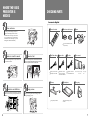
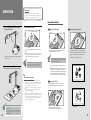
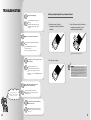
Installing or Replacing Battery on Remote Control
1. Remove the cover of battery
compartment at the back of remote
controller.
2. Insert the battery cells in the battery
compartment as positive(+) ends
contact the positive terminals.
Image is not focused on the screen
Check the lens is properly attached to the
camera.
Press “AF (Auto Focus)” button for
automatic focusing.
Check the object is placed too close.
Battery cell type: AAA type 1.5V
The image of slide or negative film is
not displayed.
Check the lightbox turns on.
Set the camera lens facing the film.
Check the lens is properly attached.
Check if you set the “NEGA/POSI” button
correctly.
3. Put the cover in place.
Caution
Random replacement of built-in battery by
other types of batteries may cause explosion.
Thus, the battery shall be replaced by the
same battery. And the used batteries shall be
disposed carefully because they can cause
environment pollutions.
Head lamp will not light up as soon
as you press “LAMP” button.
If you still have any
problems, contact to your
dealer to ask service.
It is a normal because the built-in
protection circuit is activated to protect
the lamp circuit.
The presenter will not operate by
remote controller.
Check the battery cells in the remote
controller. If they are used up, replace
new ones.
20
21