1
WPA CONFIGURATION FOR WINDOWS XP
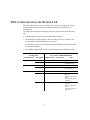
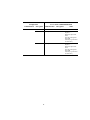
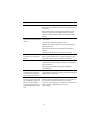
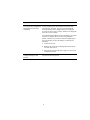
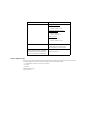
The following table shows how to configure the access point to support the various
authentication and encryption options available for Windows XP Wireless Zero
Configuration.
The following notes apply to configuring the access point for WPA under Windows
XP:
•
A WPA-capable wireless network interface card is required.
•
The Windows XP Support Patch for Wireless Protected Access, which you can
download from the Microsoft Web site, is required.
•
To allow WEP clients, clear the WPA Configuration Required check box and enter
an appropriate WEP key.
•
For all WPA configurations, 802.1x must be enabled on the Authentication page.
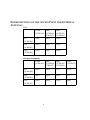
Windows XP Wireless Zero
Configuration
Authentication
Open
Shared
WPA
Access Points 7250/8250/8500/8750
Encryption
Authentication
Encryption
Other
Disabled
Open System
Disable
WEP
Open System
Enable
Enter static keys under
WEP Configuration
Disabled
Not available
WEP
Shared Key
Enable
Enter static keys under
WEP Configuration
AES
Not available on 8200
TKIP
Open System
Enable
WPA Configuration:
Required
Multicast Cipher Mode:
TKIP
WPA Key Management:
WPA 802.1x
WEP
Open System
Enable
WPA Configuration:
Required
Multicast Cipher Mode:
WEP
WPA Key Management:
WPA 802.1x
47