1
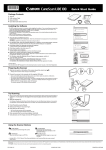
Scanning in the Upright Position
Escaneado en posición vertical
This scanner can be used in the upright position. Use the supplied stand when scanning on the stand.
Es posible utilizar este escáner en posición vertical. Utilice el soporte suministrado si utiliza el escáner en esta posición.
Setting the Stand
Removing the Stand
Instalación del soporte
Put the scanner on the stand, fitting the two holes Place a document on the document glass.
on the scanner side to the projections on the stand.
To remove the scanner from the stand, press the
hook.
Coloque el escáner en el soporte de manera que los Coloque un documento en el cristal de documendos orificios que se encuentran en el lateral del
tos.
escáner encajen con las partes salientes del soporte.
Para extraer el escáner del soporte, presione el
gancho.
Lean the scanner toward the stand.
Release the scanner from the hook.
Apoye el escáner en el soporte.
Retire el escáner del gancho.
Positioning an Item
Close the document cover carefully to prevent the
document from moving over.
Fasten the stand hook to the marked position on the
scanner until it clicks.
Colocación de un documento
Cierre la tapa de documentos con cuidado para evitar que estos se muevan.
Lift the scanner off.
Refer to the Scanning Guide (on-screen manual) for further information about ScanGear, MP Navigator EX, Scanner Buttons, and Troubleshooting. To start the
Scanning Guide (on-screen manual), double-click the on-screen manual icon on the desktop.
In this guide, Windows Vista screen shots are used to illustrate explanations common to all operating systems.
Fije el gancho en la posición marcada del escáner hasta
que haga clic.
Especificaciones
CanoScan LiDE 200
CanoScan LiDE 200
Scanner Type
Flatbed
Sensor Type
CIS (Color Contact Image Sensor)
Light Source
3-color (RGB) LED
*1
Scanning Speed *2
(Photo or Document)
16 bit input /8 bit output
2.5 msec./line (300 dpi), 4.6 msec./line (600 dpi), 8.7 msec./line (1200 dpi),
17.0 msec./line (2400 dpi), 33.3 msec./line (4800 dpi)
Color
Grayscale, B&W
Maximum Document Size
Operating Range
Humidity
Supplied via USB port (No external adapter required)
Power Consumption
In operation: 2.5 watts maximum, Stand-by: 1.4 watts, Suspend: 11 mwatts
Exterior Dimensions (W) x (D) x (H)
250 x 364 x 40 mm (9.9 x 14.4 x 1.6 in.)
Weight
*2
5°C to 35°C (41°F to 95°F)
10% to 90% RH without condensation formation
Power Requirements
4800 x 4800 ppp
25-19 200 ppp (ScanGear)
Profundidad de bits
de escaneado
Entrada de 48 bits (entrada de 16 bits para cada color (RGB)),
Salida de 48 u 24 bits (Salida de 16 u 8 bits para cada color (RGB))
Color
Entrada de 16 bits/salida de 8 bits
Escala de grises
Velocidad de
Color
escaneado*2
(fotografías o documentos)
2,5 ms/línea (300 ppp), 4,6 ms/línea (600 ppp), 8,7 ms/línea (1200 ppp),
17,0 ms/línea (2400 ppp), 33,3 ms/línea (4800 ppp)
Escala de grises,
blanco y negro
2,3 ms/línea (300 ppp), 1,5 ms/línea (600 ppp), 2,9 ms/línea (1200 ppp),
5,6 ms/línea (2400 ppp), 11,1 ms/línea (4800 ppp)
USB Hi-Speed*2
A4/Carta: 216 x 297 mm
Tamaño máximo de documento
4 buttons (COPY, SCAN, PDF, E-MAIL)
Temperature
LED de 3 colores (RGB)
Interfaz
A4/Letter: 216 x 297 mm
Scanner Buttons
*1
2.3 msec./line (300 dpi), 1.5 msec./line (600 dpi), 2.9 msec./line (1200 dpi),
5.6 msec./line (2400 dpi), 11.1 msec./line (4800 dpi)
Hi-Speed USB*2
Interface
Tipo de sensor
Resolución seleccionable
48 bit input (16bit input for each color (RGB)), 48 bit or 24 bit output (16bit or 8bit output for each color (RGB))
Grayscale
Extraplano
CIS (Color Contact Image Sensor)
(Sensor de imagen de contacto de color)
Resolución óptica *1
25-19200 dpi (ScanGear)
Color
Tipo de escáner
Fuente de luz
4800 x 4800 dpi
Selectable Resolution
Scanning Bit Depth
Levante el escáner y retírelo.
Consulte la Guía de escaneado (manual en pantalla) para obtener más información acerca de ScanGear, MP Navigator EX, los botones del escáner y la solución
de problemas. Para iniciar la Guía de escaneado, haga doble clic en el icono del manual en pantalla que encontrará en el escritorio.
En esta guía, se utilizan las capturas de pantalla de Windows Vista para ilustrar las explicaciones comunes para todos los sistemas operativos.
Specifications
Optical Resolution
Extracción del soporte
4 botones (COPY [COPIAR], SCAN [ESCANEAR], [PDF], E-MAIL [CORREO ELECTRÓNICO])
Botones del escáner
Intervalo de
funcionamiento
De 5 a 35°C (de 41 a 95°F)
Temperatura
De 10 % a 90 % de humedad relativa sin condensación
Humedad
Suministrada a través del puerto USB (no requiere un adaptador externo)
Requisitos de alimentación
En funcionamiento: 2,5 W máximo; en espera: 1,4 W, Suspendido: 11 mVatios
Consumo eléctrico
250 x 364 x 40 mm (9,9 x 14,4 x 1,6 pulgadas)
Dimensiones exteriores (An) x (Pr) x (Al)
1,6 kg aprox. (3,6 libras)
Peso
Approximately 1.6 kg (3.6 lbs.)
Optical Resolution represents the maximum sampling rate based on ISO 14473.
The fastest speed in Hi-Speed USB mode on Windows PC. Transfer time is not included. Scanning speed varies according to the document types, scan settings, or specifications of
the computer.
*1
La
*2
resolución óptica representa la frecuencia de muestreo máxima según la norma ISO 14473.
Velocidad máxima en el modo USB Hi-Speed en ordenadores con Windows. No incluye el tiempo de transferencia. La velocidad de escaneado varía en función de los tipos de
documentos, los ajustes de escaneado o las especificaciones del ordenador.
• Specifications are subject to change without notice.
• Las especificaciones pueden cambiar sin previo aviso.
Model Name: K10318 (CanoScan LiDE 200)
Nombre de modelo: K10318 (CanoScan LiDE 200)
FCC Notice (U.S.A. Only)
Model Number : K10318
This device complies with Part 15 of the FCC Rules. Operation is subject to the following two conditions: (1) This device may not cause harmful
interference, and (2) this device must accept any interference received, including interference that may cause undesired operation.
Note: This equipment has been tested and found to comply with the limits for a Class B digital device, pursuant to Part 15 of the FCC Rules. These limits
are designed to provide reasonable protection against harmful interference in a residential installation. This equipment generates, uses and can radiate
radio frequency energy and, if not installed and used in accordance with the instructions, may cause harmful interference to radio communications.
However, there is no guarantee that interference will not occur in a particular installation. If this equipment does cause harmful interference to radio or
television reception, which can be determined by turning the equipment off and on, the user is encouraged to try to correct the interference by one or more
of the following measures:
•
•
•
•
Reorient or relocate the receiving antenna.
Increase the separation between the equipment and receiver.
Connect the equipment into an outlet on a circuit different from that to which the receiver is connected.
Consult the dealer or an experienced radio/TV technician for help.
Use of a shielded cable is required to comply with Class B limits in Subpart B of Part 15 of the FCC Rules.
Do not make any changes or modifications to the equipment unless otherwise specified in the manual. If such changes or modifications should be made,
you could be required to stop operation of the equipment.
Canon U.S.A., Inc.
One Canon Plaza
Lake Success, NY 11042
1-516-328-5600
®
®
•
•
•
•
•
•
•
®
Como miembro de ENERGY STAR , Canon Inc. ha determinado que este producto cumple las directrices ENERGY STAR de eficiencia
energética.
®
As an ENERGY STAR Partner, Canon Inc. has determined that this product meets the ENERGY STAR guidelines for energy efficiency.
Warning
Advertencia
When you use this product, you should pay attention to the following legal issues:
• Scanning of certain documents, such as bank notes (bank bills), government bonds and public certificates, may be prohibited by law and may result in
criminal and/or civil liability.
• You may be required under law to obtain authorization from a person possessing copyrights or other legal rights to the item being scanned.
If you are uncertain of the legality of scanning any particular item, you should consult your legal adviser in advance.
Cuando utilice este producto, tenga en cuenta los siguientes aspectos legales:
• El escaneado de determinados documentos, como billetes de banco (letras bancarias), bonos del estado y certificados públicos, puede estar prohibido
por ley y derivar en responsabilidades civiles o penales.
• Es posible que la legislación obligue a obtener autorización de la persona que posea los derechos de autor u otros derechos legales del elemento que
se vaya a escanear.
Si no está seguro de si puede escanear legalmente algún elemento en concreto, consulte primero a su asesor legal.
Microsoft is a registered trademark of Microsoft Corporation.
Windows is a trademark or registered trademark of Microsoft Corporation in the U.S. and/or other countries.
Windows Vista is a trademark or registered trademark of Microsoft Corporation in the U.S. and/or other countries.
Macintosh and Mac are trademarks of Apple Inc., registered in the U.S. and other countries.
Adobe, Adobe RGB and Adobe RGB (1998) are either registered trademarks or trademarks of Adobe Systems Incorporated in the United States and or other countries.
©ArcSoft, Inc. All rights reserved for PhotoStudio.
Other names and products not mentioned above may be registered trademarks or trademarks of their respective companies.
•
•
•
•
•
•
•
Microsoft es una marca comercial registrada de Microsoft Corporation.
Windows es una marca comercial o marca comercial registrada de Microsoft Corporation, registrada en Estados Unidos y/o en otros países.
Windows Vista es una marca comercial o marca comercial registrada de Microsoft Corporation, registrada en Estados Unidos y/o en otros países.
Macintosh y Mac son marcas comerciales de Apple Inc., registradas en Estados Unidos y en otros países.
Adobe, Adobe RGB y Adobe RGB (1998) son marcas comerciales o marcas comerciales registradas de Adobe Systems Incorporated en Estados Unidos y/o en otros países.
©ArcSoft, Inc. Todos sus derechos quedan reservados para PhotoStudio.
Otros nombres y productos no relacionados anteriormente pueden ser marcas comerciales o marcas comerciales registradas de sus respectivas compañías.