1
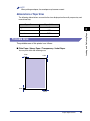
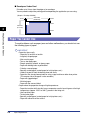
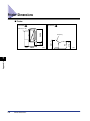
■ Envelopes / Index Card
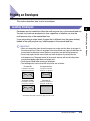
Printable up to 10 mm from the edges of an envelope.
You may need to adjust the printing position depending the application you are using.
(Sample : Envelope COM10)
241.3 mm
10 mm
(9.50 inch)
10 mm
10 mm
104.9 mm
(4.13 inch)
2
Loading and Delivering Paper
10 mm
Paper You Cannot Use
To avoid problems such as paper jams and other malfunctions, you should not use
the following types of paper:
IMPORTANT
• Paper that jams easily
- Paper that is too thick or too thin
- Irregularly-shaped paper
- Wet or moist paper
- Torn or damaged paper
- Rough, extremely smooth, or glossy paper
- Paper with binding holes or perforations
- Curled or creased paper
- Specially coated paper (coated paper for ink jet printers, etc.)
- Labels that peel off from the backing sheet too easily
- Paper that has already been printed on using a copy machine or other laser printer.
(The reverse side of the paper is also unusable.)
- Paper with jagged edges
- Wrinkled paper
- Paper with the corners folded
• Paper where the properties change at high temperatures
- Paper that contains ink that melts, burns, evaporates or emits harmful gases at the high
temperatures (approx. 150°C or 302°F) present in the fixing unit.
- Heat-sensitive paper
- Treated color paper
- Specially coated paper (coated paper for ink jet printers, etc.)
- Paper with adhesive on the surface
2-6
Paper Requirements