1
Connecting
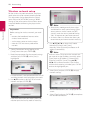
2.Use w/s/a/d to select the IP mode
between [Dynamic] and [Static].
Normally, select [Dynamic] to allocate an IP
address automatically.
21
Wireless network connection
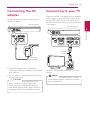
Another connection option is to use an Access Point
or a wireless router. The network configuration and
connection method may vary depending on the
equipment in use and the network environment.
2
Wireless
communication
Access point or
Wireless router
3. Select [Next] and press ENTER (b) to apply
network settings.
Broadband
service
Network connection status is displayed on the
screen.
4. Press ENTER (b) while [Close] is highlighted to
finish the wired network settings.
Refer to the setup instructions supplied with
your access point or wireless router for detailed
connection steps and network settings.
For best performance, a direct wired connection
from this player to your home network’s router or
cable/DSL modem is always the best option.
If you do chose to use the wireless option, note that
performance can sometimes be affected by other
electronic devices in the home.
Connecting
,,Note
If there is no DHCP server on the network and
you want to set the IP address manually, select
[Static] then set [IP Address], [Subnet Mask],
[Gateway] and [DNS Server] using w/s/
a/d and numerical buttons. If you make a
mistake while entering a number, press CLEAR
to clear the highlighted part.